Options
In this wizard page, you can decide what preview style to use when 'preview report' is chosen.
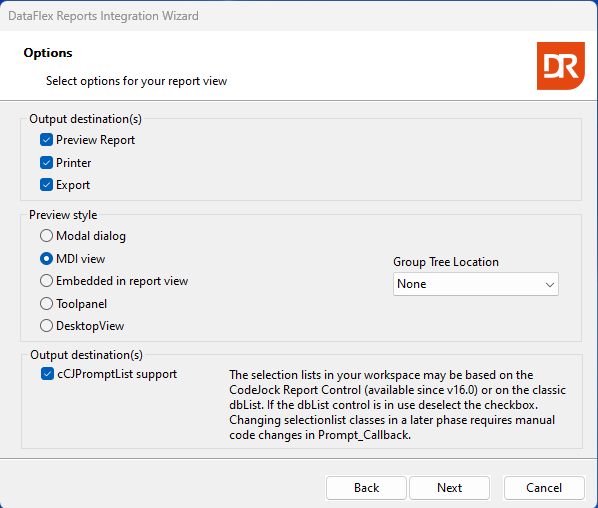
The first choice pertains to the output destinations. At least one of the checkboxes must be selected. If more than one is selected, the wizard generates a control to let the user choose. If only one option is selected, the Output_Device_Mode is set to that option.
If the report results cannot be previewed, the preview style cannot be chosen, and running the report results in the output being sent to a printer or exported to a file.
The supported preview styles are:
- Modal dialog: The preview of the results must be closed before further interaction with the application can occur. The
pePreviewStylewill be C_DRPREVIEW_MODAL. - MDI view: This preview style dynamically creates a view object (MDI child window) in the application's client area, displaying the report results. The
pePreviewStylewill be C_DRPREVIEW_VIEW. - Embedded in report view: Results and selection criteria are placed in the same view. The wizard generates a report view with two tab pages, one for the selection criteria and one for the results. The
pePreviewStylewill be C_DRPREVIEW_EMBEDDED. - Toolpanel: This style is a mix between a modal dialog and an MDI view. The results window pops out (similar to a modal dialog) from the program, but navigation to other parts of the application is possible (like an MDI view). The
pePreviewStylewill be C_DRPREVIEW_TOOLPANEL. - DesktopView: The desktop view preview style pops out but is also an MDI view. The current application taskbar button contains two panels to choose from. The
pePreviewStylewill be C_DRPREVIEW_DESKTOP.
The Group Tree Location drop-down control allows you to choose whether a group tree is desired. The group tree control only makes sense when there is grouping available in the report.
The checkbox for prompt list support can be selected if the creation of selection criteria controls was chosen earlier in the wizard process, and prompt list support can be made available by the wizard. The DataFlex framework supports two kinds of selection lists; however, the wizard cannot determine what selection lists are currently in use or will be used in the near future. Knowledge of the workspace contents is necessary to make an informed decision.
The next step will be project options.