DataOverviewReport
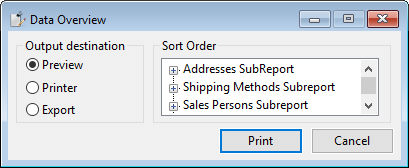
The report view allows the user to select the output destination and demonstrates how to query the names of the sub-reports using SubReportCount and SubReportId in the main report. The names of the sub-reports and the column names of the first table (all reports only have one RDS table) are added to the tree view. If the column name matches one of the [record sort fields](../../../../cdrreport-class/properties/both/psrecord-sort-field.md the tree item gets checked. Clicking the print button opens the report and enumerates the sub-report nodes in the tree view to change the record sort fields of the sub-report. For this, the AddRecordSortField method is used. After collecting and changing the record sort order, the OutputReport message is used. Often, such a button will send RunReport, but that would, in this example, destroy the just changed record sort order.