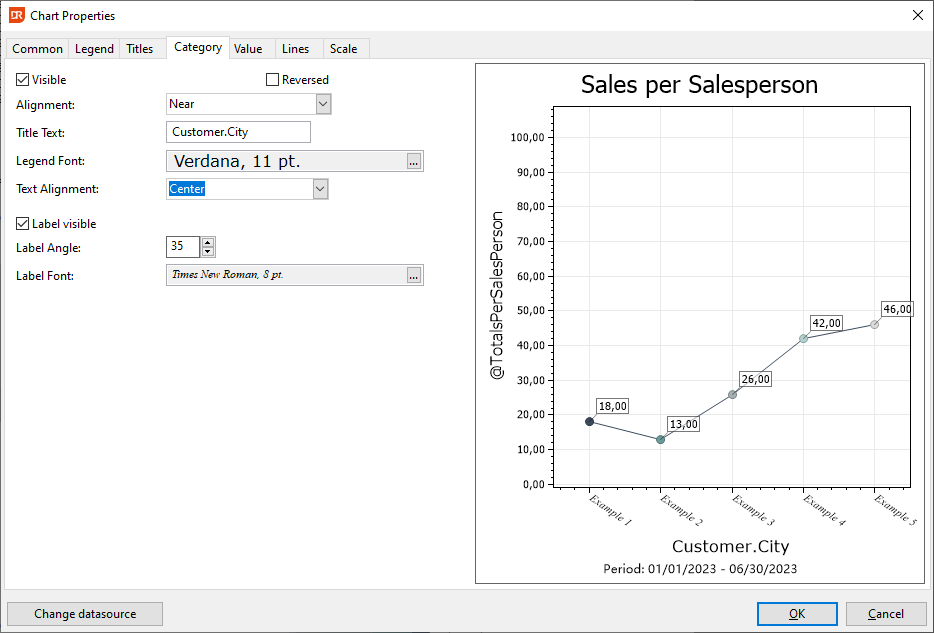
Chart Properties - Category Tab
The 'Category' tab focuses on configuring settings for the X-Axis of the chart.
- Visibility:
-
By deselecting the 'Visible' checkbox, the X-axis information is concealed from the chart.
-
Reversal:
-
Toggle the "Reversed" checkbox to invert the axis, making the last value appear as the initial value on the chart.
-
Alignment:
-
The default position for the X-axis is at the bottom ('Near' option). However, it can be repositioned to the top by choosing the 'Far' option.
-
Title Customization:
-
Modify the title's text, adjust its font, and refine its alignment to suit specific preferences.
-
Category Labels:
-
These labels are typically presented at a specific angle, often set at 45 degrees by default. Adjusting the angle to 0 will center the label directly on the axis value.
-
Color Configuration:
- If colors are designated as "Default" within this tab, the chart will employ the color palette specified in the currently active Appearance scheme.