Create New Parameter
Parameter Creation and Management
When you define a parameter in DataFlex Reports Studio, you assign it a specific data type and size. This information is essential for proper data handling and validation.
You can assign values to parameters in two ways:
- Within DataFlex Reports Studio:
- Set default values directly in the report designer.
-
These values will be used unless overridden at the integration level.
-
At the Integration Level:
- Pass parameter values dynamically when the report is integrated into your application.
- This allows for more flexible and customized report generation.
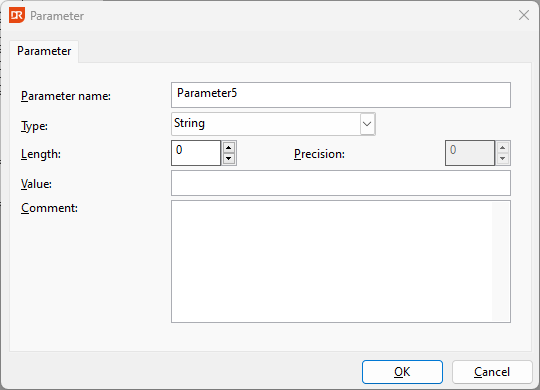
When creating a parameter, you'll be asked to specify:
- Name: A unique identifier for the parameter.
- Data Type: The type of data the parameter will accept (e.g., text, number, date).
- Length and Precision: Depending on the data type, you may need to define the maximum length or decimal precision. A parameter can never store more than 16000 bytes. There are types that allow much less:
- Double Integer: Fixed length of 20 and precision is always 0
- String: Length 1-16000, precision is always 0
- Number: Length 1-15, precision 1-8
- Integer: Fixed length of 11 and precision is always 0
- Floating point: Fixed length of 24 and precision is always 8
- Date: Fixed length of 10 and precision is always 0
- DateTime: Fixed length of 23 and precision is always 0
- Binary: Length 1-16000, precision is always 0
- Default Value: A value that will be used if no other value is provided during report execution.
- Comments: Allows you to provide additional context or documentation for each parameter.
Auto-Populating Parameters from Data Source
For reports based on stored procedures or SQL statements with parameter references, the parameter list is automatically populated with the parameters defined in the data source.
Important Note for Stored Procedure Data Sources:
Please note that for stored procedure data sources, you cannot modify the name, data type, or length of automatically populated parameters. You can only change the default value.