PDF
The PDF format is widely used for distribution of documents.
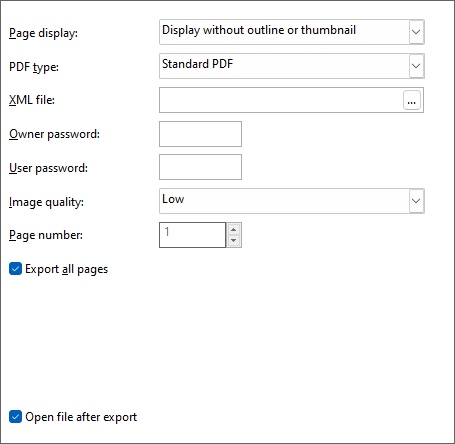
While a preferred 'Page Display' option can be selected, it is the reading program that decides how to handle it.
| Page Display Option | Description |
|---|---|
| Display full screen | The PDF document shows without any navigation controls, no Windows taskbar, etc. |
| Display with outline | Instructs the reader program to show an outline tree. The report does not have an outline, which makes this option the same as without an outline. |
| Display with thumbnail | A thumbnail is generated for each page in the PDF file, which should make navigation easier. However, in most cases, all pages look similar when viewed as thumbnails, making this option less useful. |
| Display without outline or thumbnail | Default. No outline or thumbnails are generated. The PDF is not different in size. |
The 'PDF type' option provides a selection between standard PDF, PDF/A, PDF/A 3b, and Factur-X. PDF/A, an ISO-standardized variant of the Portable Document Format (PDF), is designed specifically for the archival and long-term preservation of electronic documents. Notably, PDF/A sets itself apart from regular PDF by disallowing features deemed unsuitable for extended archiving, such as font linking (as opposed to font embedding) and encryption.
Factur-X, akin to ZUGFeRD, introduces the capability to embed an XML file containing invoice information within the PDF document. This integration enhances the document by incorporating structured data alongside the traditional PDF format, facilitating richer information exchange and document processing.
PDF documents can be further fortified through password protection. Establishing an 'Owner password' safeguards the document against unauthorized manipulation, necessitating the entry of the designated password. Additionally, configuring a 'User password' imposes an extra layer of security, compelling readers to input this password before gaining access to the document.
The 'image quality' option dictates how information, including images and gradients, is incorporated into the PDF document. In the default low-quality setting, the image mirrors the preview quality on the screen. However, when set to high quality, the image replicates the original quality, unless resizing occurs. It's important to note that image quality not only affects image rendering but also influences the presentation of gradients within the PDF document.
Finally, you can choose whether to export all pages or a specific page to the PDF file.