Report Explorer
The Report Explorer is launched from the ‘View’ menu or by clicking the button from the button bar. In a tree view, it shows the several sections of the report and provides opportunities to modify, reorder, or remove objects, or to add sections to a report. Filters for showing or hiding data fields, functions, parameters, graphical objects, and sub-reports can be toggled by their buttons at the top of the panel.
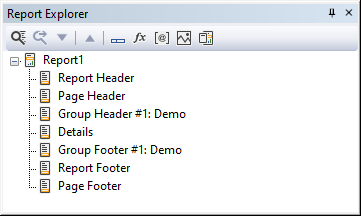
The root nodes of the report explorer are:
- Report Name
- Report Header
- Page Header
- Group Header (Optional)
- Details
- Group Footer (Optional)
- Report Footer
- Page Footer
When a section is expanded, the objects present in that section are shown.
The toolbar above the report explorer offers:
| Icon | Meaning |
|---|---|
 |
Find an object/field by name |
 |
Find next object/field based on first find |
 |
Switch the execution order of the selected object/field with the following one. With a printed value, the value will be printed on top. With a function, the execution will be after the next object. |
 |
Switch the execution order of the selected object/field with the previous one. With a printed value, the value will be printed under the next one. With a function, the execution will be prior to the next object. |
 |
Show or Hide Data Fields |
 |
Show or Hide Functions Fields |
 |
Show or Hide Parameter Fields |
 |
Show or Hide Graphical Objects |
 |
Show or Hide Sub-report Objects |