DataFlex
The DataFlex data source is used to access the DataFlex embedded database; the embedded database is a NoSQL relational database.
The DataFlex developer’s environment uses filelist.cfg, a configuration file that captures all the tables used in an application. Through filelist.cfg, relational links are defined to other DataFlex tables as well as to other types of databases, such as Microsoft SQL Server, Pervasive.SQL, or IBM DB2. By choosing ‘DataFlex’ as the data source, it is possible to combine data from different types of data sources.
Select Filelist, Workspace, Individual Tables, or Other Tables
Clicking the 'open' button brings up a Windows common dialog that can be filtered on:
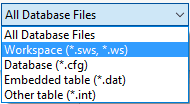
The recommended option here is "Workspace". This loads the paths defined in a .WS file in a DataFlex workspace and presents the tables stored in the filelist. This option is preferred over the second option, "Database", because it supports multiple data directories defined in the DataPath entry of the workspace configuration file.
Another option for opening tables is to open a table directly. When opening tables directly, both .dat and .int type files can be used.
Notes
- If you use Managed Connections in DataFlex (defined in a DFConnId.ini file), use ODBC as a data source, then choose DataFlex Managed Connection.
- If you use DataFlex without Managed Connections, we recommend using an ODBC data source instead of the DataFlex data source in combination with
.intfiles, as the ODBC data source offers significantly better performance when used in conjunction with SQL databases.