Report Menu - Filter Expert
The Filter Expert can be launched from the 'Report' menu or by clicking the appropriate button in the button bar.
The Filter Expert allows for specifying which records are to be shown in a report. When an ODBC datasource is used, the selection information is passed to the SQL select statement. When the DataFlex embedded database is used, DataFlex Reports attempts to perform a jump into, jump out of index operation to limit the number of rows to read from the database.
For more complex filters, filter functions can be defined manually. See the Filter Function topic.
Adding a filter starts with selecting a database field in the available fields tree view. The tree view shows two top-levels: 'Report fields' showing the fields that are used in the report and 'Database Fields' showing all tables and fields.
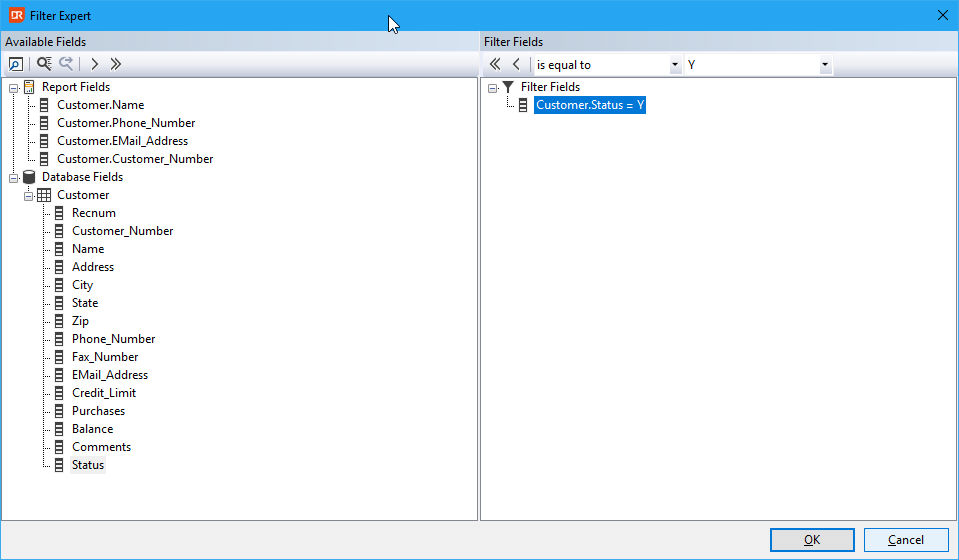
Click on the 'Browse Data' button in the button bar at the top of the tree view to inspect the content of a selected field.
By clicking the 'Find Field' button, a field can be found based on the name entered. This is particularly useful if the tree view contains many entries.
After selecting a database field, a filter can be added by clicking the button with the single arrow pointing to the right.
Removing a filter is done in a similar fashion. Select the filter and click the button with the single arrow pointing to the left to remove the filter.
A filter can be added by selecting the type from the combo box, for instance: 'is greater than'. Next, the value can be entered in the entry form, for example '1000', or by selecting a value from a selection list by clicking the prompt button.
Notes
- For DataFlex data-sources, only filters on the left-most table can be optimized. This means that when you have a report using the orderheader table and the customer table and you want to filter on customer number, you should select the customer number from the orderheader table instead of the customer number from the customer table. This assumes the table relationship is an inner join and the relationship is defined from the orderheader table to the customer table.