CustomerList
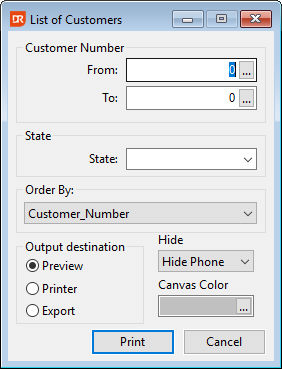
The report view contains two filter options: one for the customer number range and another for the USA state. The filters can be combined or omitted, making them optional. When the user enters customer numbers that are not ordered from low to high, the numbers are reversed in the filter passed to the report. If filters are applied, the report integration collects the used filter information and passes it to the report, allowing the information to be printed in the report footer. The interface allows the user to select a sort order; however, instead of using the standard record sort, this option sets the contents of a user-defined function that is utilized by the group expert for grouping. In this specific report, the grouping serves as sorting since the details section and the group footer are not used. Changing the code in the combo form for sorting to a non-unique value (like USA state) will not yield the desired results, as only one customer will be printed from the group. The user interface also allows the user to choose whether to hide the phone, fax, or both, setting two report parameters based on this choice. These parameters are used in the report for dynamic layout. The last option in the user interface demonstrates canvas color selection. While this feature works well, it is not recommended to allow users to select this for each report integration; it merely illustrates how it can be done. Through the OnPrintReport event, the report integration code controls the number of copies to print and sets the option in the Windows print dialog, allowing the user to specify a page range (e.g., print pages 1 and 3). The report view does not create and use a DDO for the customer table, as it requires a from and to customer value. The selection list available for customer selection is the standard selection list provided by the example workspace. The report preview employs the desktop preview style, enabling the user to select the report view or the results window when hovering over the taskbar button.