How to use Windows API functions in DataFlex Reports
This topic explains how to add a function to the ExternalLibraryFunctions.dll that uses a Windows API function. The Windows API function PathFileExists will be added. Because the parameter received from DataFlex Reports contains a BSTR Variant value, it is better to use the PathFileExistsW function rather than the PathFileExistsA function.
Add an include statement to the source that includes the function definitions where PathFileExists is part of.
#include "Shlwapi.h"
Insert the following code into the ExternalLibraryFunctions.cpp file:
VARIANT __declspec(dllexport) FileExists(VARIANT vPathFile)
{
    int retval;
    CComVariant vRes;

    USES_CONVERSION;

    // Check argument type
    if (vPathFile.vt != VT_BSTR)
    {
        vRes.vt = VT_ERROR;
        vRes.scode = MAKE_HRESULT(1, FACILITY_ITF, IDS_PARAM1_NO_BSTR);
        return vRes;
    }

    retval = PathFileExistsW(vPathFile.bstrVal);

    // return a boolean instead of an integer variable
    vRes = (retval == 1);
    return vRes;
}
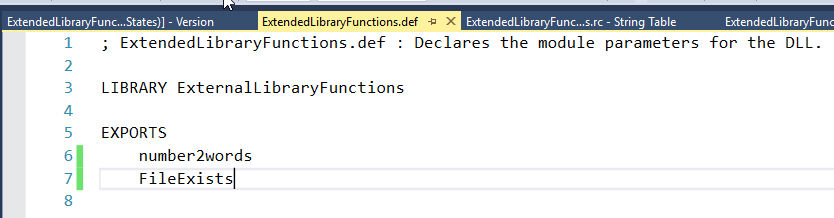
Open the ExtendedLibraryFunctions.def file to define the function to be exported. Make the content as shown in the following picture.
Open the ExtendedLibraryFunctions.rc file to define version numbers, copyright, and add two error texts to the string table so that DataFlex Reports can produce an error about the problems found.
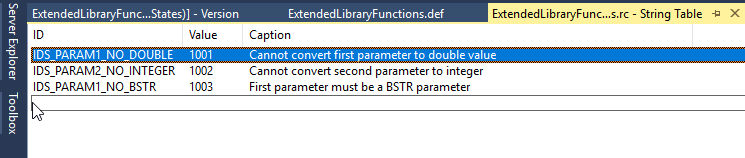
If the above (string table) is skipped, replace the IDS_PARAM1_NO_BSTR used in the source code with some integer value. The DLL will not be created if the constants are not there.
Now the library is finished and can be built. To build the library, click on the menu, build, and select build solution.
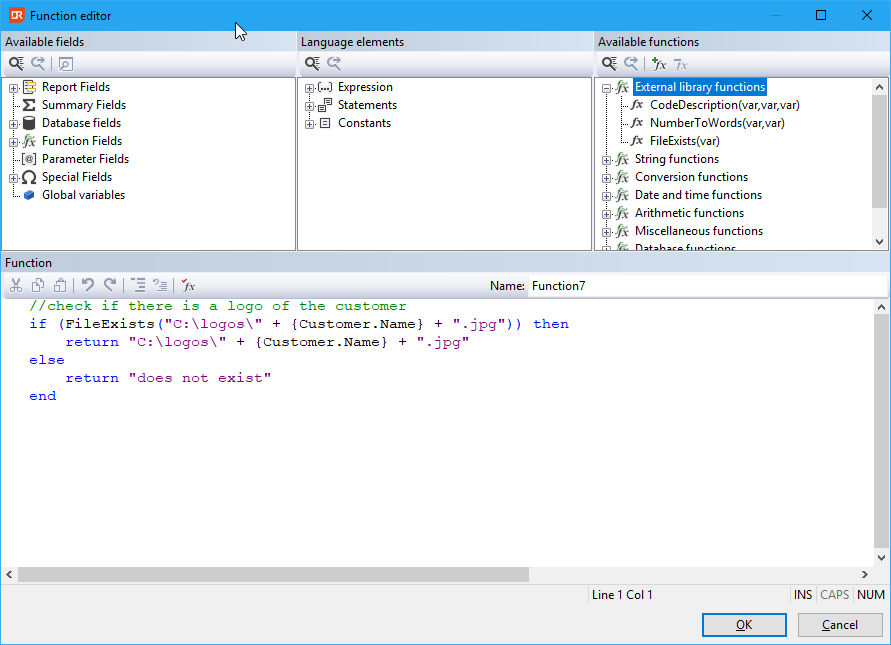
Copy the DLL as before to the DataFlex Reports installation folder and add the new function to the registered ELF functions in the function editor dialog. Then use the function with code like: