Visual Report Writer and The Web (II)
As a follow-up story on Visual Report Writer and the web, this time we present the first report available on the demo website for Visual Report Writer. You might think, "only one?" but read on and discover that there is enough to tell about this report and the integration.
Invoices Report
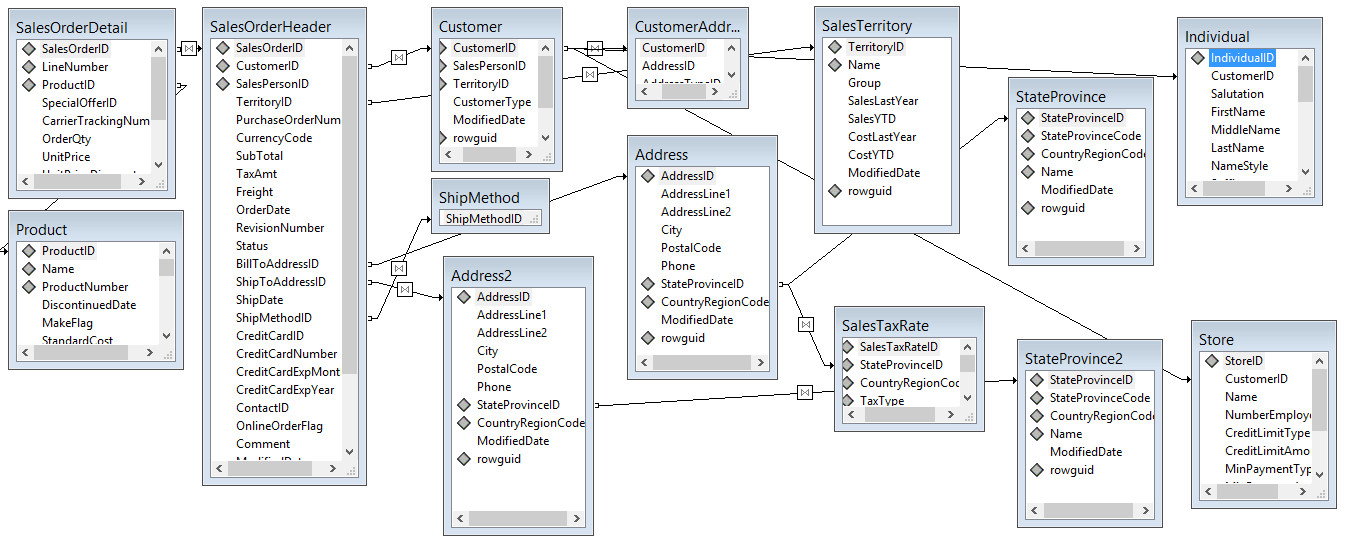
The first report that can be started on the website is called Invoice. The report uses the Microsoft Adventure Works 2000 database as its data source and utilizes 14 tables to build the results. Notably, customer information needs to be collected from two tables. Customers can be shops or individuals. To collect the information, the report employs a left outer join between the customer table and the shop table, as well as a left outer join between the customer and individual tables. Both links originate from the same source column, which is impossible from a DataFlex table relationship as it would link to either table A or table B. The table relationship model is illustrated in the following image:
Integration
The web report view allows visitors to browse through the customers. Because a normal relationship is not possible (the customer ID needs to relate to either a shop or an individual), the relate_main_file event in the customer data dictionary object is augmented to find either the store or the individual's record when locating a particular customer. This is feasible because the customer record contains a column that specifies the customer type (store or individual). The Relate_Main_File event is as follows:
Procedure Relate_Main_File
    Forward Send Relate_Main_File
    If (SQLCustomer.CustomerType = 'I') Begin
        Clear SQLIndividual
        Move SQLCustomer.CustomerID to SQLIndividual.CustomerID
        Find Eq SQLIndividual by 3
    End
    Else Begin
        If (SQLCustomer.CustomerType = 'S') Begin
            Clear SQLStore
            Move SQLCustomer.CustomerID to SQLStore.CustomerID
            Find Eq SQLStore by 3
        End
    End
End_Procedure
To display either the name of the store or the name of the individual, the cWebForm control for the customer name is not directly connected to a table.column reference but instead utilizes the OnSetCalculatedValue event.
Object oCustomerNameForm is a cWebForm
    Set piColumnSpan to 10
    Set piColumnIndex to 3
    Set pbShowLabel to False
    Set pbEnabled to False

    Procedure OnSetCalculatedValue String ByRef sValue
        If (SQLCustomer.CustomerType = 'I') Begin
            Move SQLIndividual.LastName to sValue
        End
        Else Begin
            If (SQLCustomer.CustomerType = 'S') Begin
                Move SQLStore.Name to sValue
            End
            Else Begin
                Move '' to sValue
            End
        End
    End_Procedure
End_Object
Finally, to ensure the prompt object functions correctly, the peUpdateMode property of the prompt object is set to umPromptCustom, and the psPromptUpdateCallBack is assigned to a custom method named ShowAndFindCustomer. The code for this method is as follows:
Object oCustomerIDForm is a cWebForm
    Entry_Item SQLCustomer.CustomerID
    Set psLabel to "Customer:"
    Set piColumnSpan to 3
    Set peLabelAlign to alignRight

    WebPublishProcedure ShowAndFindCustomer

    Procedure ShowAndFindCustomer Handle hoPrompt
        Handle hoServer
        Integer iMainFile

        Get Server of hoPrompt to hoServer
        Get Main_File of hoServer to iMainFile
        If (iMainFile = SQLIndividual.File_Number) Begin
            Send Clear of oSQLCustomer_DD
            Get Field_Current_Value of hoServer Field SQLIndividual.CustomerID to SQLCustomer.CustomerID
            Send Find of oSQLCustomer_DD EQ 1
        End
        Else Begin
            Send Clear of oSQLCustomer_DD
            Get Field_Current_Value of hoServer Field SQLStore.CustomerID to SQLCustomer.CustomerID
            Send Find of oSQLCustomer_DD EQ 1
        End
    End_Procedure
End_Object
If you closely examine the selection list, you will see that the dialog contains two tab pages, each containing a cWebList object. The first tab page displays the store names, while the second tab page shows the names of the individuals. I experimented with combining both sets of data into one list using an ESQL statement but deemed it too slow due to the volume of data and the need to sort names. While not implemented, we could have created a view in the database that combines both tables and adjusted the table link to use the view.
The code for the double selection list is as follows:
Use cWebModalDialog
Use cWebPanel.pkg
Use cWebButton.pkg
Use cWebPromptList.pkg
Use cWebColumn.pkg
Use cWebTabContainer.pkg
Use cWebTabPage.pkg

Use cSQLIndividualDataDictionary.dd
Use cSQLStoreDataDictionary.dd

Object oSQLCustomerWebLookup is a cWebModalDialog
    Set piColumnCount to 8
    Set psCaption to "Select Customer"
    Set piWidth to 700
    Set piHeight to 400
    Object oSQLIndividual_DD is a cSQLIndividualDataDictionary
    End_Object

    Object oSQLStore_DD is a cSQLStoreDataDictionary
    End_Object

    Object oWebTabContainer is a cWebTabContainer
        Set pbFillHeight to True

        Object oStoresTabPage is a cWebTabPage
            Set psCaption to "Stores"
            Set piColumnCount to 8

            Object oStoresPromptList is a cWebPromptList
                Set pbFillHeight to True
                Set piColumnSpan to 8
                Set piOrdering to 4
                Set Server to oSQLStore_DD
                Set peUpdateMode to umPromptCustom
                Set psPromptUpdateCallback to "ShowAndFindCustomer"
                Set piUpdateColumn to 0

                Object oSQLCustomerIDForm is a cWebColumn
                    Entry_Item SQLStore.CustomerID
                    Set psCaption to "Nr"
                    Set piWidth to 30
                End_Object

                Object oSQLCustomerNameForm is a cWebColumn
                    Set psCaption to "Name"
                    Set piWidth to 150
                    Entry_Item SQLStore.Name
                End_Object
            End_Object

            Object oOkButton is a cWebButton
                Set psCaption to "OK"
                Set piColumnSpan to 1
                Set piColumnIndex to 5

                Procedure OnClick
                    Send Ok of oStoresPromptList
                End_Procedure
            End_Object

            Object oCancelButton is a cWebButton
                Set psCaption to "Cancel"
                Set piColumnSpan to 1
                Set piColumnIndex to 6

                Procedure OnClick
                    Send Cancel of oStoresPromptList
                End_Procedure
            End_Object

            Object oSearchButton is a cWebButton
                Set psCaption to "Search..."
                Set piColumnSpan to 1
                Set piColumnIndex to 7

                Procedure OnClick
                    Send Search of oStoresPromptList
                End_Procedure
            End_Object

            Procedure SelectAndClose
                Send Ok of oStoresPromptList
            End_Procedure
        End_Object

        Object oIndividualsTabPage is a cWebTabPage
            Set psCaption to "Individuals"
            Set piColumnCount to 8

            Object oIndividualsPromptList is a cWebPromptList
                Set pbFillHeight to True
                Set piColumnSpan to 8
                Set piOrdering to 4
                Set Server to oSQLIndividual_DD
                Set peUpdateMode to umPromptCustom
                Set psPromptUpdateCallback to "ShowAndFindCustomer"
                Set piUpdateColumn to 0

                Object oSQLCustomerIDForm is a cWebColumn
                    Entry_Item SQLIndividual.CustomerID
                    Set psCaption to "Nr"
                    Set piWidth to 30
                End_Object

                Object oSQLCustomerNameForm is a cWebColumn
                    Set psCaption to "Name"
                    Set piWidth to 150
                    Entry_Item SQLIndividual.LastName
                End_Object
            End_Object

            Object oOkButton is a cWebButton
                Set psCaption to "OK"
                Set piColumnSpan to 1
                Set piColumnIndex to 5

                Procedure OnClick
                    Send Ok of oIndividualsPromptList
                End_Procedure
            End_Object

            Object oCancelButton is a cWebButton
                Set psCaption to "Cancel"
                Set piColumnSpan to 1
                Set piColumnIndex to 6

                Procedure OnClick
                    Send Cancel of oIndividualsPromptList
                End_Procedure
            End_Object

            Object oSearchButton is a cWebButton
                Set psCaption to "Search..."
                Set piColumnSpan to 1
                Set piColumnIndex to 7

                Procedure OnClick
                    Send Search of oIndividualsPromptList
                End_Procedure
            End_Object

            Procedure SelectAndClose
                Send Ok of oIndividualsPromptList
            End_Procedure
        End_Object
    End_Object

    Set pbServerOnSubmit to True

    Procedure OnSubmit
        Handle hoCurrentCard

        Get CurrentCard of oWebTabContainer to hoCurrentCard
        Send SelectAndClose of hoCurrentCard
    End_Procedure

    Set pbServerOnShow to True

    Procedure OnShow
        Send InitializePromptList of oStoresPromptList
        Send InitializePromptList of oIndividualsPromptList
    End_Procedure
End_Object
Special in the above code are the OnShow and OnSubmit routines. The OnShow is typically kept hidden for the developer. In this case, it is coded to address both selection lists and instructs them to load data. The OnSubmit is special because it specifies which selection list should return its information.
The cWebView also contains two cWebDateForm controls to select the date range, with the minimum and maximum date values from the table displayed in the controls. The dates are retrieved by executing an ESQL statement during the OnLoad event of the control.
Object oOrderFromDate is a cWebDateForm
    Set psLabel to "Order Date From:"
    Set piColumnSpan to 4
    Set peLabelAlign to alignRight

    Procedure OnLoad
        Handle hoSQL hoConnection hoStatement
        Integer iFetchResult
        String sDate
        Date dDate

        Forward Send OnLoad

        Get Create (RefClass (cSQLHandleManager)) to hoSQL
        Get SQLFileConnect of hoSQL SQLCustomer.File_Number to hoConnection
        Get SQLOpen of hoConnection to hoStatement
        Send SQLExecDirect of hoStatement "select MIN ([salesorderheader].[orderdate]) from [salesorderheader]"
        Repeat
            Get SQLFetch of hoStatement to iFetchResult
            If (iFetchResult <> 0) Begin
                Get SQLColumnValue of hoStatement 1 to sDate
                Get SQLDateToDFDate of hoStatement sDate to dDate
                Set psValue to dDate
            End
        Until (iFetchResult = 0)

        // Clean up
        Send SQLClose to hoStatement
        Send SQLDisconnect to hoConnection
        Send Destroy of hoSQL
    End_Procedure
End_Object
If you were to create a report without a customer selected and thus only based on the date range, you would generate a report with more than 14,000 pages of information. While Visual Report Writer can handle this, the web does not like to wait that long, so it is wise to limit the result set. When you click the button to print the invoices, a check for customer ID and a date range check is executed.
Object oRunReportMenuItem is a cWebMenuItem
    Set psCaption to "Print Invoices"
    Set psTooltip to "Print the invoices using the selections"
    Set psCSSClass to "VRWPrintReportButton"

    Procedure OnLoad
        String[] aParams
        Forward Send OnLoad
        Move "ConfirmResponse" to aParams[0]
        Move 2 to aParams[1]
        Send ClientAction "setActionMode" aParams
    End_Procedure

    Procedure ConfirmResponse Integer eConfirmMode
        If (eConfirmMode = cmYes) Begin
            Send GenerateReport of oReport
        End
    End_Procedure

    WebPublishProcedure ConfirmResponse

    Procedure OnClick
        DateTime dtFrom dtTo
        Integer iCustomerNumber
        WebGet psValue of oCustomerIDForm to iCustomerNumber
        If (iCustomerNumber = 0) Begin
            Send ShowInfoBox "A Customer Selection is required"
            Procedure_Return
        End
        WebGet psValue of oOrderFromDate to dtFrom
        WebGet psValue of oOrderToDate to dtTo
        If (SpanTotalDays (dtTo - dtFrom) > 100) Begin
            Send ShowYesNo of oWebApp (Self) (RefProc (ConfirmResponse)) "The date range exceeds 100 days. Are you sure you want to generate a report with this range? Reporting may take some time to generate." "Date Range Large!"
        End
        Else Begin
            Send GenerateReport of oReport
        End
    End_Procedure
End_Object
The use of ConfirmResponse would be sufficient to initiate the report, but the OnLoad event completes it by instructing the framework to display a loading indicator during report generation. If the report was started from a button, this would typically be activated automatically, but the use of the menu item control does not trigger that. With the code in OnLoad, the waiting circle appears.
In the code above, the report is generated by sending a message named GenerateReport. This is not a method defined in the cVRWReport class but is coded in the object to generate this specific report. In the method, the report needs to be located and opened, and it must be instructed to output the results to a file, as this report uses PDF for displaying results. For those familiar with Visual Report integration, it should be clear that OpenReport and ExportReport are the key messages to be sent.
During OpenReport, the event OnInitializeReport is triggered. In the following code, you can see that this event is used to set the value of a parameter named ImagePath. The report uses an image and needs to be informed where to locate the file with the image. We need to do this because the location will differ on the web server compared to my development machine. The image is stored in the same folder as the report, and thus psReportLocation can be used as the path.
Procedure OnInitializeReport
    String sReportLocation
    Integer iParameter

    Get psReportLocation to sReportLocation
    Get ParameterIdByName C_USEMAINVRWREPORTID 'ImagePath' to iParameter
    Set psParameterValue C_USEMAINVRWREPORTID iParameter to sReportLocation
    Send SetFilters
End_Procedure
To maintain code readability, a routine to set the filter information is created, named SetFilters. In this routine, the values of the customer ID, start date, and end date are retrieved. Notice that the values need to be retrieved via WebGet and not via a normal Get. Also, the dates are converted to a string value needed by SQL Server for selection via the function DateTimeToString, which is a function of cVRWReport.
Procedure SetFilters
    Integer iCustomerId
    Date dFrom dTo
    String sFrom sTo

    WebGet psValue of oCustomerIDForm to iCustomerId
    WebGet psValue of oOrderFromDate to dFrom
    WebGet psValue of oOrderToDate to dTo

    Send RemoveAllFilters C_USEMAINVRWREPORTID

    If (iCustomerId <> 0) Begin
        Send AddFilter C_USEMAINVRWREPORTID "{Customer.CustomerId}" C_VRWEqual iCustomerId
    End
    If (not (IsNullDateTime (dFrom))) Begin
        Get DateTimeToString dFrom to sFrom
        Send AddFilter C_USEMAINVRWREPORTID "{SalesOrderHeader.OrderDate}" C_VRWGreaterThanOrEqual sFrom
    End
    If (not (IsNullDateTime (dTo))) Begin
        Get DateTimeToString dTo to sTo
        Send AddFilter C_USEMAINVRWREPORTID "{SalesOrderHeader.OrderDate}" C_VRWLessThanOrEqual sTo
    End
End_Procedure
Finally, we arrive at the point of report output and display. As mentioned, the output needs to be spooled to a PDF file. To prevent two users/sessions from receiving the same or each other's results, the code creates a unique filename. It does this by calling the new ReportCacheFileName function in the VRW library. The generated results are stored in a folder that is not directly accessible over the web. A special function named DownloadURL (defined in the resource manager) converts the absolute path into a unique download URL that is only available for a limited time and only for the current session ID.
Procedure GenerateReport
    String sReportId sFile sUrl
    VRWPDFExportOptions PDFExportOptions
    Boolean bCanceled

    Get OpenReport to sReportId
    If (sReportId <> "") Begin
        Get DefaultPDFExportOptions to PDFExportOptions
        Set pPDFExportOptions to PDFExportOptions
        Get ReportCacheFileName ".pdf" to sFile
        If (sFile <> "") Begin
            Send ExportReport C_vrwPDF sFile
            Get pbCanceled to bCanceled
            If (not (bCanceled)) Begin
                Get DownloadURL of ghoWebResourceManager sFile to sUrl
                If (sUrl <> "") Begin
                    WebSet psUrl of oViewer to sUrl
                End
            End
        End
        Send CloseReport sReportId
    End
End_Procedure
The URL generated by DownloadURL is assigned to the oViewer object, which is an instantiation of the cWebIFrame class.
I hope this blog guides you on the path of using Visual Report Writer together with the DataFlex Web Application Framework.