Getting started with DataFlex Reports
The first things to look at are:
Options
Check the 'Options' from the 'File' menu and make sure that DataFlex Reports uses the preferred defaults. All possible options are covered in the options section.
Language
Consider changing the language of the Studio. For more information on how to change the language and the available languages, read The Language menu.
How to create a report?
There are
three
four
ways to start creating a new report:
- Use the DataFlex Reports Integration Wizard
What data?
Before creating a new report, it is important to decide what data needs to be shown and how the information will be grouped.
Let's suppose that the report needs to show order information and that the orders must be presented in groups of order lines per order number. The data needed for making this report would be:
- Per 'order-line':
- product-number
- product-description
- quantity
- price
- Per order:
- For the 'order header':
- order-number
- order-date
- customer-name
- customer-address
- payment and shipping conditions
- For the 'order footer':
- total order amount
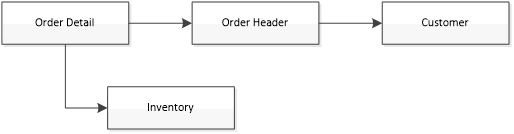
Next, determine which tables are needed to show the necessary information. Typically, for a report that needs to show order information, the order-header, order-details, products or inventory, and customer tables are needed.
These tables need to be related to each other. The relationship looks like this:
Other things to consider
- In which order must the data be presented? Will it be sorted by order number or customer number?
- Must all orders be printed, or should it be possible to filter certain orders? What are the filtering criteria?