Support for HTML formatted text
What is new - 24.0
This version marks a significant milestone as it allows data to be presented within a report object in HTML format without displaying the raw HTML code. DataFlex Reports leverages LiteHTML for parsing HTML data. However, it's important to note that LiteHTML has its limitations and does not support all the advanced HTML features found in modern browsers like Chrome, Firefox, or Edge. It's also not designed to handle complete HTML documents that render well in browsers.
In essence, while LiteHTML provides the capability to incorporate HTML-style formatting and presentation within reports, it operates within a subset of HTML functionality. Therefore, complex HTML layouts or advanced browser-specific features may not be fully supported or may not render as expected in the report output.
This feature enables the inclusion of formatted content and styling within reports, but users should keep in mind that it's intended for simpler HTML formatting and may not replicate the full capabilities of a web browser's rendering engine.
How to start
To show HTML, the text type of the field/object has to be set to "HTML".
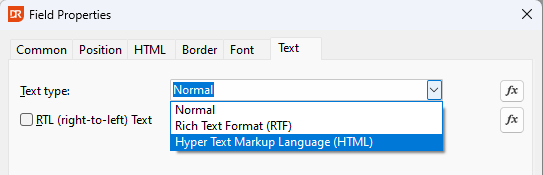
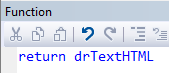
This can be done unconditionally by choosing from the drop-down or conditionally via a function.
Data
The HTML data can come from a column inside a database table or produced by a function or a combination of both.
Examples
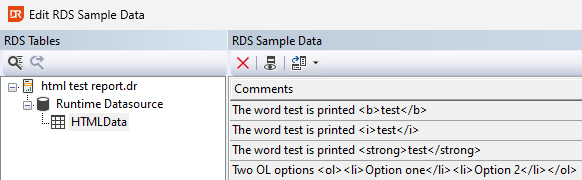
The above picture shows HTML data in an RDS-based table row.
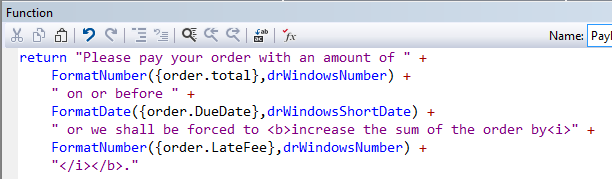
The above picture shows the use of constant text with HTML markup combined with functions to format the order total, due date, and late fees.
It is possible to go deeper and add a div element with formatting such as:

In the above function, the results of an SQL() call will be formatted in a DIV element with a different font size than the rest. Do you need the DIV with the font size to enlarge the content? No, you can do this too with the standard text size if it was for the whole object. To make only a part bold and bigger, such as:

you can use a function like:

CSS
The HTML parser supports default CSS settings, and this can be changed in three places.
Style element in function
With the use of a <style> element, it is possible to add or enhance the formatting. For example, the following can be added to the formatting:
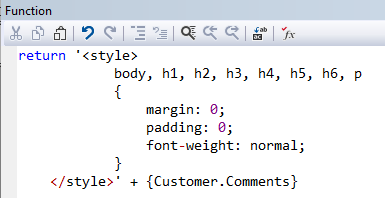
The above changes the margin and padding of the HTML formatted field as well as the font weight.
CSS imported from a file/URL
Via the HTML LINK attribute, it is possible to import CSS definitions from an external resource.

The above imports CSS information from a file on disk, but the HREF can also point to a website.

Global CSS
It is possible—per report—to redefine the global CSS that needs to be used. This is done in the Report Options dialog on the tab-page CSS. Note that the value there replaces the default CSS that comes with the HTML parser built into DataFlex Reports. This means you need to define all formatting normally done via CSS completely.
Margins & Paddings
When a text with HTML markers is getting formatted with the default CSS and variable height for the object is not set to true or the height is too small, no text will appear due to clipping. Solutions are:
- Add CSS styling information to remove/change the default margin/padding.
- Turn on the variable height.
Known limitations
- Limited Search in Previewer: The search functionality in the previewer is limited to individual words. Searching for phrases like "this text" won't work because each word is treated as a separate HTML object.
- High HTML Memory Consumption: HTML content consumes significant memory, making reports with formatted text more memory-intensive. Extremely large reports, like 5000 pages, may not perform well.
- Slower Formatting: HTML usage can slow down the formatting process, especially with larger reports.
- No Editing in Previewer: Editing the layout directly in the previewer, a feature available since version 7, does not work for HTML-formatted text.
- No JavaScript Support: JavaScript is not supported within HTML-formatted text.
- Avoid Markup Inside Words: Using markup within a single word (e.g.,
<b>t</b>est) can introduce spacing between characters, impacting appearance. - Round Bullets Rendered as Boxes: Round bullets in HTML lists are rendered as boxes with rounded corners, which may not look as desired.
- Rendering Differences and Clipping: Differences in rendering and potential clipping can occur compared to normal text, especially with elements that have hard-coded margins, like table borders and list bullets.
- Background Colors Implemented as Boxes: Background colors in HTML (e.g., table cells or text backgrounds) are implemented as boxes due to the LiteHTML API, potentially obscuring underlying text.
- HTML Limitations: While basic HTML formatting is supported, not all browser features are available in DataFlex Reports. Features like videos, external files, forms, buttons, inputs, and selects are not supported.
- Image Support: SVG images are unsupported, and support for other image types depends on how and where they are supplied to the rendering engine.
- Export Limitations: Exporting HTML-formatted fields/objects has limitations in various formats:
- CSV: Exporting fields with HTML may result in each word becoming a separate field in the CSV data.
- Excel: Most HTML markup disappears during export to Excel.
- HTML: Words may appear clipped in the HTML export. It's advisable to avoid formatting fields as HTML when exporting to HTML.
- Vertical and Horizontal Alignment Issues: Vertical alignment between a normal field and an HTML-formatted field may not align perfectly. Additionally, there may be differences in horizontal spacing between words due to limitations in GDI+.
- Not in crosstabs: The current functionality only permits the use of the "normal" text type for both row and column labels, excluding the option to employ any alternative text types.
Understanding these limitations can help users effectively utilize HTML formatting in DataFlex Reports and make informed decisions when designing and exporting their reports.