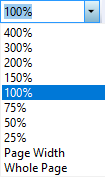
Standard Toolbar - Zoom control
This option can be used to zoom in or out on the report designer. Zooming in (up to 400%) can ease the placing/editing of objects. Zooming out (down to 25%) can give more overview.
Page Width scales the design to the available width.
Whole Page scales the design such that a full page fits exactly on the screen.