Insert Toolbar - Sub-report
This toolbar button is for inserting a sub-report. From the toolbar, two options can be chosen.
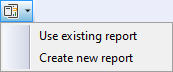
First, choose the desired option and then move the mouse cursor to the position in the report where the sub-report has to appear. Keep the mouse button pressed while adjusting the size of the sub-report. The size of the rectangle for the inserted sub-report is important, as it determines the paper size of the sub-report.
When your sub-report rectangle is small and you select multiple columns in the create new report, their size will be very small (width divided by the number of selected columns). For an existing report, the results may be clipped.