Report Menu - Record Sort Expert
The Record Sort Expert can be launched from the 'Report' menu or by clicking the appropriate button in the button bar.
Data can be sorted on the value of one or more fields.
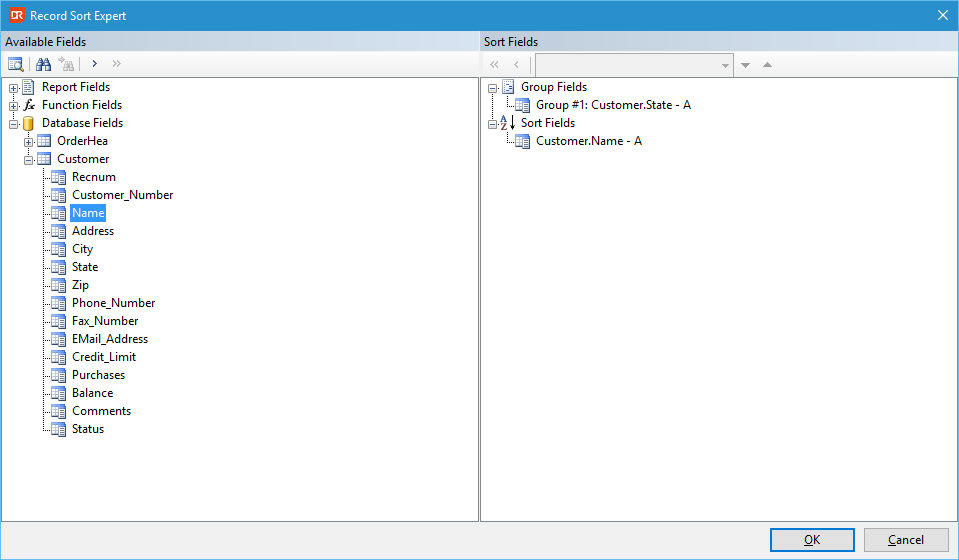
The dialog is divided into two panels. The left-hand side panel shows a tree view with the available data to sort on. The right-hand side panel shows the used sort order. If the report contains grouping, the group fields are shown and they take precedence over the selected sort fields.
Available fields
Adding a sort order starts with selecting a database or function field. After selecting a database or function field, a new sort order can be added by clicking the button with the single arrow pointing to the right.
Tree-view
The available fields tree view shows three top-levels:
- Report fields: showing the database fields that are used in the report.
- Function Fields: showing the user-defined function fields.
- Database fields: showing all tables and fields available in the report.
Tool-bars
The tool-bar on the left-hand side contains the following five buttons:
| Button | Key | Explanation | |
|---|---|---|---|
 |
Browse data | Available for tree items that map to a database column. Clicking the button pops up a dialog showing a sample of the data. | |
 |
Find & Find Next | Click the find button to pop up a dialog where you enter the name of a column to find. The first column with a matching name (complete or containing the entered text) will be selected. | |
 |
Find Next | Click the find next button to find the next matching column. If no more results can be found, the search stops without a message. | |
 |
Add | Click the button to add the current table.column or function reference to the sort order. | |
 |
Add all | Click the button to add all the columns of a table to the list of sort fields or all the functions or all the used table columns. Columns or functions already in the list will be skipped. |
The tool-bar on the right-hand side contains the following five buttons/options:
| Button | Key | Explanation | |
|---|---|---|---|
 |
Remove all | Click this button to remove all sort fields. | |
 |
Remove | Click this button to remove the currently selected sort field from the list. | |
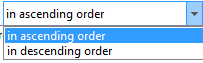 |
Sort direction | Use the drop-down to select the sort direction of a sort field. Sort direction can be ascending (A-Z and 0-9) or descending (Z-A and 9-0). The selected sort direction will be shown at the end of the sort field via a single character (A or D) separated by a dash. | |
 |
Demote | Click the button to demote the sort field. Only available when there is a next sort field. | |
 |
Promote | Click the button to promote the sort field. Only available when the current sort field is not the first sort field. |
Notes
- A group sort executes before a record sort, which means that the record sort is always within a group (if present).