Report Explorer - Common Floating Menu
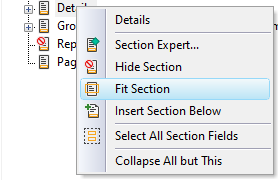
The following table explains all the options of the floating menu.
| Function | Description |
|---|---|
| Section Expert... | Start the Section Expert. |
| Hide Section | Toggling the option to hide or show a section. |
| Fit Section | Changes the size of a section, automatically removing white space at the bottom of a section. |
| Insert Section Below | Insert a new section and place it below an existing section. |
| Merge Section Below | Shown when the section is split into sub-sections and can be used to combine two sections. |
| Select All Section Fields | Select all objects in a section (for example, to move or delete all at once). |
| Collapse All but This | Collapse all nodes in the report explorer except for the currently pointed node. |