Field Explorer - Parameter Fields
The parameters node of the field explorer shows all parameters defined for the report. Parameters can be used for stored procedures, SQL statement-based data sources, and in a variable global to the report (but not to its sub-report(s)).
A new parameter can be created via the floating menu on the node "Parameter Fields" or via the 'create new' button in the toolbar at the top of the field explorer.
Creating
The 'create new parameter' option pops up the following dialog:
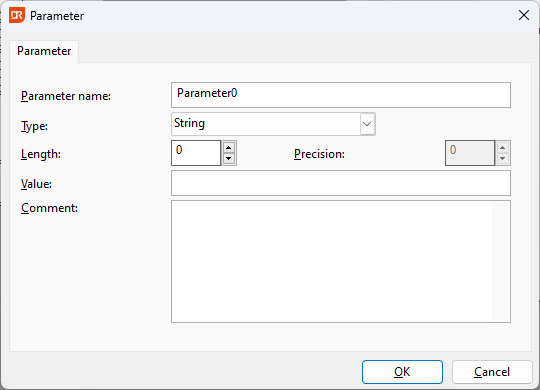
The name of the parameter is a required value and must be unique. Parameter names cannot start with a numeric character.
The 'String', 'Number', and 'Binary' type parameters require entering a length. A length of 0 is not allowed. A 'Number' type parameter requires a precision value; 0 is not allowed.
For 'Binary' type parameters, the value must be specified in Base64 encoded format.
For 'Date' and 'Datetime' type parameters, the allowed date range is 1601/01/01 - 9999/12/31.
Inserting
Inserting a special field in the report can be done via drag-and-drop, choosing 'insert field into report' from the floating menu, or using the 'insert field into report'  button in the field explorer's toolbar.
Editing
Editing a parameter is generally not a problem, but be careful when the parameter is used in comparisons. Expecting the parameter to contain a number where it now returns a date will cause errors.
Deleting
Deleting a parameter that is not in use is always possible. Deleting a parameter that is in use gives a warning. A parameter used as a field in the report layout (e.g., print customer name) will be deleted from the layout. A parameter used in a formula breaks the functionality of the function, and this should be immediately fixed.
Renaming
Renaming a parameter that is in use is generally not a problem. When the parameter is used in a function, its name will be changed in the function. Parameters that are created as part of an SQL statement should not be renamed, as they will be recreated when a change is made in the data source.