Color and End Color
The background color of a section can be set by choosing the preferred color in the combo-box.
Instead of picking a color from the predefined colors or color selector, it is possible to return the color via a function. For example, each other row in the report output can get a different color through the results of a function. Use the following steps to create a report with output like:
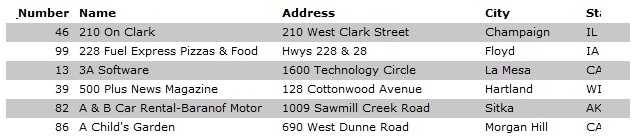
- Create a report on the customer table with the shown columns.
- Open the report expert.
- Click the details section in the available sections tree view.
- Click the background color item.
- Click the function button.
- Enter the following function, close the dialog, and if needed, refresh the report.
if (mod({&Record Number},2) = 0) then
    return (rgb(255,255,255))
else
    return (rgb(200,200,200))
end
Instead of using the RGB() function, one of the predefined color constants can be used.