Used Sort Fields
The used sort field pane of the Record Sort Field Experts looks like:
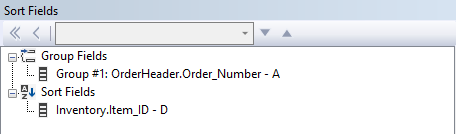
The record sort is always performed within a group when groups are present. Therefore, the shown situation causes the data to be sorted in descending alphabetical order on item_id within an order. The buttons in the right-hand side toolbar can be used to:
Remove all record sort field Available on the Sort Fields or any Sort Field node and removes the field from the sort fields.
Remove a record sort field Available on any Sort Field node and removes that field from the sort fields.
Change the sort direction Dropdown to indicate whether the data needs to be sorted in ascending or descending order. Available on any Sort Field node.
Promote / Demote the field in the record sort order Moves the currently selected Sort Field node up or down in the sort order, thereby making it more or less important.