Relationships
To use multiple tables in a report, relationships must be defined between those tables. In most cases, the relationship between two tables is based on two common fields pointing from the field in one table to the field in the other table. Sometimes a relationship between tables requires multiple fields, which is supported by DataFlex Reports.
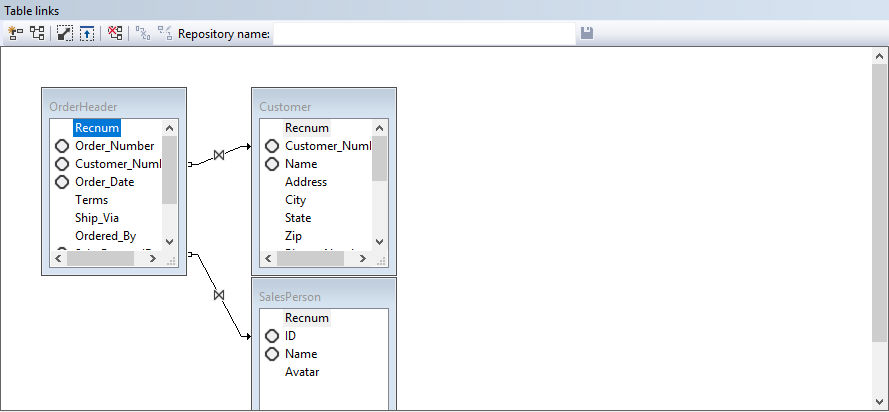
Table relationships can be described in the following situations:
- 1:N relationship: 1 row of the parent table can be linked to multiple child table rows. For example, customer orders.
- N:M relationship: Linking two parent rows to each other. For example, courses and students. A student can only follow the course once.
- 1:N relationship: 1 row of a table can link to 1 row of another table, extending the current row.
The example above shows the relationship between the 'OrderHeader' table and the 'Customer' and 'Salesperson' tables from the DataFlex Order entry example.
Take a closer look at the relationship between the tables OrderHeader and Customer. When the table link goes from OrderHeader to Customer, the system can use the customer data of this order. Customers without current orders cannot be found and listed. If the table link were defined from Customer to OrderHeader, all customers can be listed, and if they have orders, the orders can be shown.
For each report, the type of relationship between the tables needs to be defined. The way relationships are made also influences performance, where filtering criteria and indices on tables are important factors as well.
The diamond symbol in front of the columns of a table indicates that the given database column is (part of) an index. Using indexes for table links improves performance, and for the DataFlex embedded database, it is a requirement.
A relationship is created by selecting the common field in the main file and dragging the mouse while keeping the left mouse button pressed towards the common field in the other related table.
Relationships can only be made between two tables if the common fields are of the same type and length. Clicking with the right mouse button on a field offers the 'Show Field Types' option, showing the data type and field length.
For DataFlex embedded database tables, the link to the column needs to have a unique index.
A right mouse click on the relationship line brings the links floating menu.