Report Options - Options Tab - Default Locale
DataFlex Reports uses the Windows user locale for both input and output locale by default. The input locale is used by, for example, filters. The output locale is used for formatting numbers and dates when printing a report. When deploying reports on a machine with a different Windows user locale, the formatting of the output can change. To enforce a specific locale for both input and output, you can set this option to the desired locale. On deployment, this locale is always used regardless of the Windows user locale of the deployment machine. When deploying reports with a specific locale, make sure the locale is installed on the deployment machine.
When selecting "None," web applications by default run under the Windows System account and thus use the settings of this account. This means there might be a difference between the report running in DataFlex Reports Studio and when running from the browser. There are three or four (DataFlex 2021 and beyond) solutions available:
- Select a specific locale for the report (e.g., English).
- Set the locale using a function (see below). This also allows changing the settings via report integration.
- Synchronize the region settings in Windows between the current and the system user. One can do this via the "Administrative tab-page" and the "Copy" button. The settings of the system account are stored by Windows in the registry under
Computer\HKEY_USERS\.DEFAULT\Control Panel\International. - Let the web application run under a different Windows user with the same settings as the developing user. This is possible per DataFlex 2021.
When using a function to specify the locale, use a language identifier constant as defined by the Windows operating system. This is useful when integrating reports. The constants can be found in the integration library (LANG_XXX constants).
A function could be:
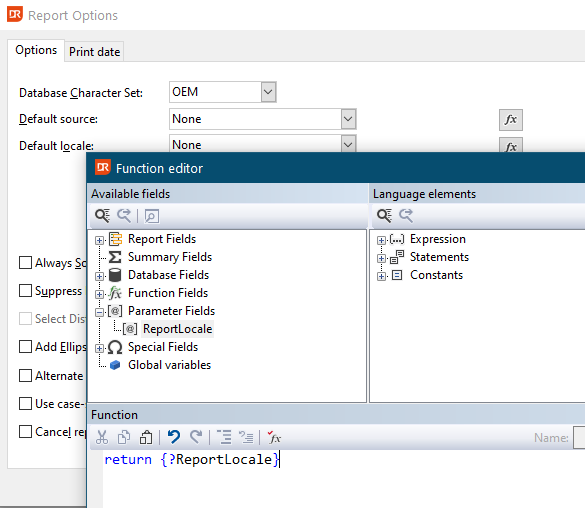
The function in the above screenshot returns the value stored in a self-defined parameter named ReportLocale.
At the integration level, the contents of the parameter could be changed:
Integer iParameter
Get ParameterIdByName sReportId "ReportLocale" to iParameter
Set psParameterValue sReportId iParameter to LANG_GERMAN
This will change the output from:
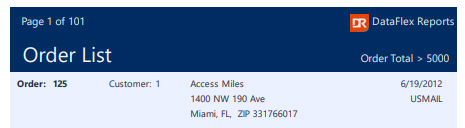
to:
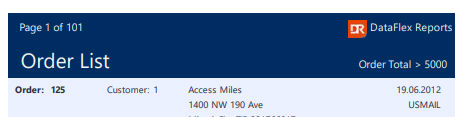
Notes
- When using sub-reports, the main report will determine which locale will be used for the input and output, regardless of whether the sub-report itself uses a specific locale.
- When switching to a different report in either the designer or at the integration level, the Studio and the report results act differently.