Field Properties - Common Tab - Wrap Text
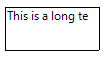
If the to-be-printed value is too long for the object width, the value will be clipped.
Assume the value to be printed is "This is a long text".
If the checkbox 'Wrap text' is checked, wrapped text appears in the object but only if the object is high enough to contain the text; in other words, it will not be clipped.
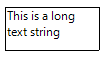
The height of the object will not change using this setting. If the height should change, use the Variable Height option.
The setting can be specified via the 'Wrap text' checkbox or via the result of a function. An example of a function to align the field is:
if {?TextWrap} = 1 then
    return True
else
    return False
end