Architecture Mismatch
From version 8, the DataFlex Reports Developer
From version 8, the DataFlex Reports Standard
OCX is either a 32-bit or 64-bit product. The application architecture (x86 or x64) determines which version is used.
The DataFlex Reports Studio is a 64-bit application, which means it utilizes the 64-bit version of the DataFlex Reports Developer Edition OCX, and this OCX can only load or use ODBC drivers with the same architecture (x64).
The DataFlex Reports Studio is a 64-bit application, which means it utilizes the 64-bit version of the DataFlex Reports Standard Edition OCX, and this OCX can only load or use ODBC drivers with the same architecture (x64).
When a report is created based on a DSN (Data Source Name), the report only contains the name of the DSN.
The ODBC Manager tool from Windows is either 32-bit or 64-bit and is capable of configuring both 32-bit and 64-bit DSNs.
This means that when only a 32-bit DSN is available, the DataFlex Reports Studio cannot use the DSN. Consequently, if an older report (v7 or older) points to a DSN with the wrong architecture, the following error will occur:
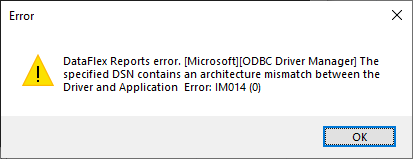
The same issue can arise during report integration. If the DSN mentioned in the connection string of the report is not available in either the 32-bit or 64-bit version, the same error will occur.
This indicates that it may be necessary to create two DSNs with the same name. This requirement depends on the architecture of the application. For DataFlex v20 and later, the application can be either 32-bit or 64-bit, but for DataFlex 19.1 and earlier, the application is always 32-bit. Depending on this, two DSNs need to be created: one based on the 32-bit architecture and one based on the 64-bit architecture of the underlying driver. Ensure that the correct ODBC Manager tool is used.