DRExportOptionsDialog.dg
The Export Options dialog can be used to easily export the data of a DataFlex Report to a file, instead of previewing or printing it.
The dialog allows for exporting the report to the following formats: PDF, CSV, Image, HTML, XLS, and RTF. For each format, different options are available. A filename must be entered, and upon clicking OK, the export will be written to file.
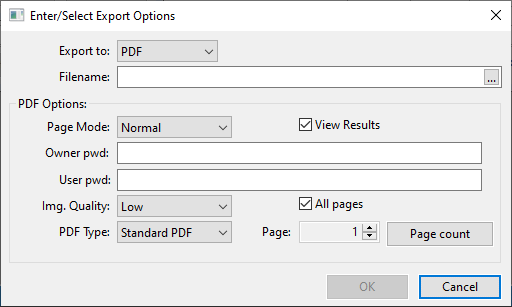
Note: This is a Windows dialog. It cannot be used in a web application.
Implementation
The Export Options dialog is defined as a ModalPanel in the file DRExportOptions.dg of the DataFlex Reports integration library.
Object oDRExportOptionsDialog is a ModalPanel
In the cDRReport class, the handle [phoExportOptionsDialog](../../cdrreport-class/properties/windows/phoexport-options-dialog.md
Property Handle phoExportOptionsDialog (oDRExportOptionsDialog)
To use this dialog in an application, extend the OnInitializeReport procedure of the cDRReport object. Just set the output destination to PRINT_TO_FILE:
Object oReport is a cDRReport
    Procedure OnInitializeReport
        Integer eOutputDeviceMode
        Forward Send OnInitializeReport
        // Convert from the ReportView Output_Device_Mode to peOutputDestination
        Set peOutputDestination to PRINT_TO_FILE
    End_Procedure
When the RunReport procedure of this object is called, the Export Options dialog will appear, due to the following code of the OutputReport procedure in the cDRReport class:
Get phoExportOptionsDialog to hoExportOptionsDialog
If (hoExportOptionsDialog <> 0) Begin
    Send ExportReport of hoExportOptionsDialog Self
End
The Export Options dialog will then collect the options from the user, and when OK is clicked, it will call the ExportReport procedure of the cDRReport class, where the actual export file is created.
Filtering the export options
Through the use of the pbShowExportToCSV, pbShowExportToHTML, pbShowExportToImage, pbShowExportToPDF, pbShowExportToRTF, and pbShowExportToXLS, export options are made available as choices to the user.