ExportReportDialog.wo
The ExportReport Web Modal Dialog can be used in a typically desktop-style web project to export the results of a report to one of the available export formats.
The dialog allows for exporting the report to the following formats: PDF, CSV, various image types, HTML, XLS, and RTF. For each format, different options are available. Upon clicking OK, the export will be opened in the browser.
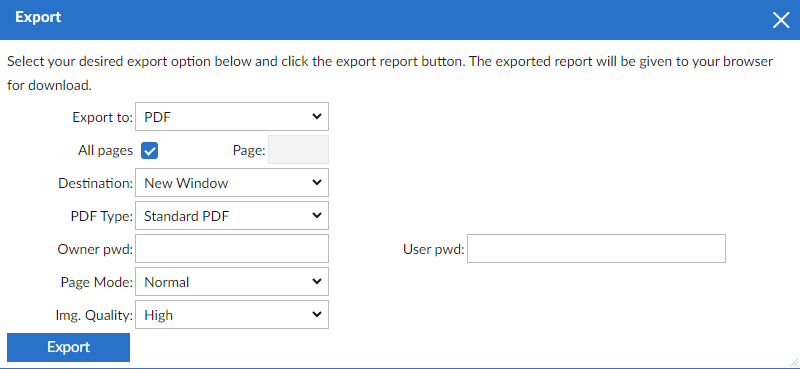
Example
An example of its use can be found in the WebOrder workspace.
In this example, two web views (CustomerListSample.wo and CustomerOrdersSample.wo) contain a cWebButton object to open the ExportReport modal dialog.
In the code below, the OnClick event is used to open the dialog, and the OnCloseModalDialog is used to retrieve the export options. The export options are returned as an array of NamedValuePair values, which can be used with ExportReportToDownloadURL, a method defined in the cDRReport class to further handle the export of the report.
Use ExportReportDialog.wo

Object oExportButton is a cWebButton
    Set psCaption to "Export Report"
    Set piColumnSpan to 8

    Procedure OnClick
        Send Popup of oExportReportDialog Self
    End_Procedure

    Function ReportExportType Returns Integer
        Integer eExportType

        Get peExportType of oReport to eExportType
        Function_Return eExportType
    End_Function

    Procedure OnCloseModalDialog Handle hoModalDialog
        tWebNavigateData ExportOptions

        Get ExportChoices of hoModalDialog to ExportOptions

        Send ExportReportToDownloadURL of oReport ExportOptions.NamedValues
    End_Procedure
End_Object
The use of ReportExportType is optional, and when used, it automatically sets the current value for the cWebCombo with export type selection to the preferred choice.
Notes
In DataFlex Reports 24.0, a new feature was added to control which export options should be available. This feature includes the declaration of the following cDRReport class properties:
- pbShowExportToCSV
- pbShowExportToHTML
- pbShowExportToGIF
- pbShowExportToJPEG
- pbShowExportToPNG
- pbShowExportToPDF
- pbShowExportToRTF
- pbShowExportToTIFF
- pbShowExportToXLS
- pbShowExportToXLSX
To respect these settings, the application that opens the export options dialog needs to send the message CopyExportOptions to the oExportOptionsDialog. This means the example code changes to:
Procedure OnClick
    Send CopyExportOptions of oExportReportDialog (oReport)
    Send Popup of oExportReportDialog Self
End_Procedure
When using the new pbShowXXX properties, ensure that the peExportType does not conflict with one of the property settings.