Class: cWebView2Browser
Properties | Events | Methods | Index of Classes
The Microsoft Edge WebView2 control allows you to embed web technologies in your windows application
Hierarchy
cObject > cUIObject > DfComUIObject > DfInPlaceComObject > DfComActiveXControl > cComActiveXControl > cComWebView2Ctrl > cBaseWebView2Browser > cWebView2Browser
Show full hierarchy and direct subclasses
Library: Windows Application Class Library
Package: cWebView2Browser.pkg
Description
The Microsoft Edge WebView2 control allows you to embed web technologies (HTML, CSS, and JavaScript) in your Windows application. It can display full web pages loaded from the internet or from disk but it can also display small snippets of HTML. Extensive APIs are available for configuring the available options and for communication with the page.
WebView2 is a component provided by Microsoft that is based on the Edge technology, but installed separately. More information about availability can be found here: https://developer.microsoft.com/en-us/microsoft-edge/webview2/. Like Edge, it uses the Chromium engine that is nowadays used by most browsers.
Displaying a Web Page
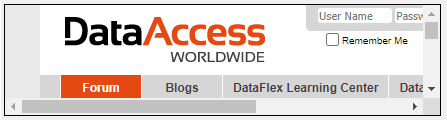
The example below shows the browser component in its simplest form. It displays the web page configured via psLocationURL and acts as a full browser, allowing navigation around the website.
Object oWebView2Browser1 is a cWebView2Browser
    Set Size to 78 228
    Set Location to 3 2
    Set peAnchors to anAll
    Set psLocationURL to "https://support.dataaccess.com/"
    Set pbBorderVisible to True
End_Object
Display Custom HTML
Sample
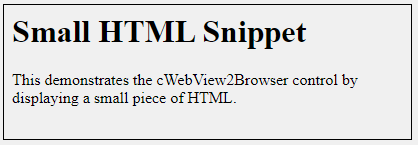
This example shows how to display HTML from memory, with most default browser functionality disabled.
Object oWebView2Browser2 is a cWebView2Browser
    Set Size to 78 228
    Set Location to 3 2
    Set peAnchors to anAll
    Set pbBorderVisible to True
    Set pbAreDefaultContextMenusEnabled to False
    Set pbAreBrowserAcceleratorKeysEnabled to False
    Set pbAreDevToolsEnabled to False
    Set pbAreDefaultScriptDialogsEnabled to False
    Set pbIsStatusBarEnabled to False
    Set pbIsZoomControlEnabled to False

    Procedure OnCreate
        Send NavigateToString @"
            <h1>Small HTML Snippet</h1>
            <p>This demonstrates the cWebView2Browser control by displaying a small piece of HTML.</p>"
    End_Procedure
End_Object
Navigational Events
Several events are available during the navigation operations. A unique ID identifies to which navigation operation the event belongs. 1. OnNavigationStarting WebView2 starts to navigate to the specified URL. The host application can disallow the navigation by setting bCancelNavigation to True. On cancelling or failure it will skip directly to OnNavigationCompleted. 2. OnSourceChanged The source changed to a new URL. This does not have indicate that a network request happened. 3. OnContentLoading WebView starts loading content for the new page. 4. OnHistoryChanged The navigation caused the history to be updated. 5. OnNavigationCompleted The navigation has completed and the new content has been loaded.
Virtual Host
The virtual host feature of WebView2 allows the definition of a virtual host name (internet address) to be mapped to a local folder on disk. Resources loaded from this URL will actually be loaded from this folder. Loading resources directly from disk using file:// is subject to many security restrictions in browsers, where loading data from a virtual host does not have these restrictions. The example below shows how to map https://apphtml.asset/ to the AppHtml folder and how to load index.html from that folder.
Object oWebView2Browser1 is a cWebView2Browser
    Set Size to 103 243
    Set Location to 3 4

    Procedure OnCreate
        String sPath

        Get psAppHtmlPath of (phoWorkspace(ghoApplication)) to sPath

        Send SetVirtualHostNameToFolderMapping "apphtml.asset" sPath OLECOREWEBVIEW2_HOST_RESOURCE_ACCESS_KIND_ALLOW

        Send Navigate "https://apphtml.asset/index.html"
    End_Procedure
End_Object
Communicating with the Page
WebView2 provides two methods to communicate with the page inside the browser. By executing custom JavaScript or using the message API.
Execute Script
JavaScript can be executed immediately using ExecuteScript and on page load using AddScriptToExecuteOnDocumentCreated. The ExecuteScript API can also be used to query values from the page, since the result of the script is returned in the OnExecuteScriptFinished event. The execution id can be used to determine to which script a result belongs.
Object oWebView2Browser1 is a cWebView2Browser
    Set Size to 79 243
    Set Location to 6 3

    Procedure OnCreate
        Send NavigateToString @"
<html>
<head>
    <title>WebView Test Page</title>
</head>
<body>
    <h1>WebView Test Page</h1>
</body>
</html>"
    End_Procedure

    Procedure OnExecuteScriptFinished UBigInt iExecutionId Integer iErrorCode String sResult
        Send Info_Box sResult "Result:"
    End_Procedure
End_Object

Object oDocTitleButton is a Button
    Set Size to 14 70
    Set Location to 89 6
    Set Label to 'Document Title'

    // fires when the button is clicked
    Procedure OnClick
        UBigInt iExecutionId

        Get ExecuteScript of oWebView2Browser1 @"document.title;" to iExecutionId
    End_Procedure

End_Object
Message API
The message API provides two way communication between the page and the host (DataFlex) application.
Sample
The example below shows how messages can be sent from JavaScript to the host, which triggers the OnWebMessageReceived event. It also shows how messages can be sent using PostWebMessageAsString, which triggers the message event on the window.chrome.webview object in JavaScript.
Object oWebView2Browser1 is a cWebView2Browser
    Set Size to 80 405
    Set Location to 6 5

    Procedure OnCreate
        Send NavigateToString (@'
<html>
<head>
<title>WebView Message</title>
<script>
    window.chrome.webview.addEventListener("message", oEv =>{
        alert("Message received: " + oEv.data);
    });
</script>
<body>
    <button onclick="window.chrome.webview.postMessage(' + "'The page says hi!'" + @')">Send message</button>
</body>
</html>')
    End_Procedure

    Procedure OnWebMessageReceived String sUrl String sMessageAsJson String sMessageAsString
        Send Info_Box sMessageAsString
    End_Procedure
End_Object

Object oMessageBtn is a Button
    Set Location to 92 9
    Set Label to 'Send message'

    // fires when the button is clicked
    Procedure OnClick
        Send PostWebMessageAsString of oWebView2Browser1 "DataFlex says hi!"
    End_Procedure

End_Object
Drag and Drop Support
This control can be used as a valid drop target by registering it as such in a cWebDragDropHelper object.
The supported actions for this control are: - C_WebDropOnControl
This allows the control to accept data dragged from elsewhere in the control (if configured that way) and can also be used to accept files when registered within a cWebDragDropFileHelper.