Class: cWebGroup
Properties | Events | Methods | Index of Classes
The Web Framework group control
Hierarchy
cObject > cWebBaseObject > cWebObject > cWebBaseUIObject > cWebBaseDEOServer > cWebBaseControl > cWebGroup
Show full hierarchy and direct subclasses
Library: Web Application Class Library
Package: cWebGroup.pkg
Mixins: cWebBaseContainer_mixin, cWebDDOHost_Mixin
Description
This component is positioned as a control, but can be used as a container to put controls in. It has a caption and a border (that can be hidden, see pbShowBorder).
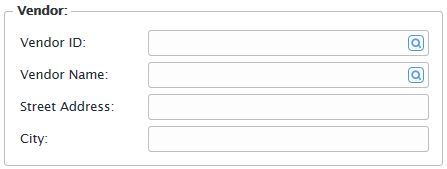
Object oVendorContainer is a cWebGroup
        Object oVendor_DD is a cVendorDataDictionary
        End_Object

        Set Main_DD to oVendor_DD
        Set Server to oVendor_DD

        Set psCaption to "Vendor:"
        Set piColumnSpan to 5
        Set piColumnCount to 9

        Set pbCollapsible to True

        Object oVendor_ID is a cWebForm
            Entry_Item Vendor.ID
            Set piColumnSpan to 0
            Set psLabel to "Vendor ID:"
            Set peAlign to alignLeft
        End_Object

        Object oVendor_Name is a cWebForm
            Entry_Item Vendor.Name
            Set piColumnSpan to 0
            Set psLabel to "Vendor Name:"
        End_Object

        Object oVendor_Address is a cWebForm
            Entry_Item Vendor.Address
            Set piColumnSpan to 0
            Set psLabel to "Street Address:"
        End_Object

        Object oVendor_City is a cWebForm
            Entry_Item Vendor.City
            Set piColumnSpan to 0
            Set psLabel to "City:"
        End_Object
    End_Object
The example above shows how the group can be used. Note that it has both piColumnCount and piColumnSpan properties, showing that it is both a control and a container.
Drag and Drop Support
This control can be used as a valid drop target by registering it as such in a cWebDragDropHelper object.
The supported actions for this control are: - C_WebDropOnControl
This allows the control to accept data dragged from elsewhere in the control (if configured that way) and can also be used to accept files when registered within a cWebDragDropFileHelper.