Class: cWebMenuList
Properties | Events | Methods | Index of Classes
Web Class that renders a list style menu supporting multiple levels
Hierarchy
cObject > cWebBaseObject > cWebObject > cWebBaseUIObject > cWebBaseDEOServer > cWebBaseControl > cWebMenuList
Show full hierarchy and direct subclasses
Library: Web Application Class Library
Package: cWebMenuList.pkg
Mixins: cWebBaseMenu_mixin
Description
This control renders a list style menu supporting multiple levels.
Submenus slide in from the right and a back button is available to go a level up. Regular cWebMenuItem objects can be used to add menu items.
Alternatively, OnDefineMenu can be used to define the menu dynamically.
Sample
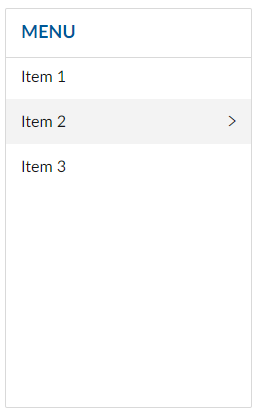
The example below shows how a static menu can be shown with three root items and one with a submenu.
Object oWebMenuList1 is a cWebMenuList
    Set piColumnSpan to 3

    Object oWebMenuItem1 is a cWebMenuItem
        Set psCaption to "Item 1"

        Procedure OnClick
            Send ShowInfoBox "Clicked Item 1"
        End_Procedure
    End_Object

    Object oWebMenuItem5 is a cWebMenuItem
        Set psCaption to "Item 2"

        Object oWebMenuItem2 is a cWebMenuItem
            Set psCaption to "Sub A"
        End_Object

        Object oWebMenuItem4 is a cWebMenuItem
            Set psCaption to "Sub B"
        End_Object
    End_Object

    Object oWebMenuItem3 is a cWebMenuItem
        Set psCaption to "Item 3"
    End_Object
End_Object
The screenshot below shows the resulting menu. The caption 'Menu' is determined by the psRootCaption property.
Icons in Web Menu Lists
By default, pbShowIcons is set to False in this class. If you want to display icons in menu items (cWebMenuItem) in this class, set pbShowIcons to True.
Drag and Drop Support
This control can be used as a valid drop target by registering it as such in a cWebDragDropHelper object.
The supported actions for this control are: - C_WebDropOnControl
This allows the control to accept data dragged from elsewhere in the control (if configured that way) and can also be used to accept files when registered within a cWebDragDropFileHelper.