Class: cWebTabPage
Properties | Events | Methods | Index of Classes
The Web Framework tab page control. Used inside a tab container to create a stack of tabbed overlaid panels.
Hierarchy
cObject > cWebBaseObject > cWebObject > cWebBaseUIObject > cWebBaseDEOServer > cWebBaseContainer > cWebCard > cWebTabPage
Show full hierarchy and direct subclasses
Library: Web Application Class Library
Package: cWebTabPage.pkg
Description
Multiple cWebTabPage objects are nested inside a parent cWebTabContainer. This provides a vertical stack of pages where each page can contain additional web controls. Each tab page is represented by a captioned tab. Only one page is displayed at a time. Users can navigate to a page by clicking its tab and an interface exists for programmatically navigating through the pages.
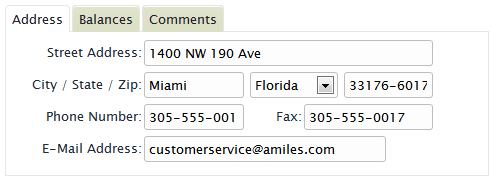
Tab containers are ideal for building views or dialogs containing many controls. Instead of displaying all of the controls in a single scrolling window you can arrange the controls in multiple tabbed pages.
The cWebTabContainer class supports the same interface as the cWebCardContainer class. The difference between a tab container and a card container is mostly how the pages are visually represented.
Sample
Object oTabContainer is a cWebTabContainer
    Set pbFillHeight to True
    Set piColumnSpan to 10

    Object oAddress_page is a cWebTabPage
        Set piColumnCount to 10
        Set psCaption to "Address"

        Object oCustomerAddress is a cWebForm
            Entry_Item Customer.Address
            Set piColumnSpan to 9
            Set psLabel to "Street Address:"
        End_Object

        Object oCustomerPhone_Number is a cWebForm
            Entry_Item Customer.Phone_Number
            Set piColumnSpan to 5
            Set psLabel to "Phone Number:"
        End_Object
    End_Object

    Object oBalances_page is a cWebTabPage
        Set piColumnCount to 10
        Set psCaption to "Balances"

        Object oCustomerPurchases is a cWebForm
            Entry_Item Customer.Purchases
            Set piColumnSpan to 4
            Set psLabel to "Total Purchases:"
        End_Object

        Object oCustomerBalance is a cWebForm
            Entry_Item Customer.Balance
            Set piColumnSpan to 4
            Set psLabel to "Balance Due:"
        End_Object
    End_Object

    Object oComments_page is a cWebTabPage
        Set piColumnCount to 10
        Set psCaption to "Comments"

        Object oCustomerComments is a cWebEdit
            Entry_Item Customer.Comments
            Set piColumnSpan to 0
            Set pbShowLabel to False
            Set pbFillHeight to True
        End_Object
    End_Object
End_Object
The above example demonstrates a tab container object containing three tab pages. Each tab page, in turn, contains a series of other controls (cWebForm and cWebEdit objects).
For more information regarding the features and functionality of the cWebTabPage class, refer to cWebCard.
Drag and Drop Support
This control can be used as a valid drop target by registering it as such in a cWebDragDropHelper object.
The supported actions for this control are: - C_WebDropOnControl
This allows the control to accept data dragged from elsewhere in the control (if configured that way) and can also be used to accept files when registered within a cWebDragDropFileHelper.
See Also