Class: cWebColumnLink
Properties | Events | Methods | Index of Classes
Web Framework class that generates a link, making the value of the column clickable
Hierarchy
cObject > cWebBaseObject > cWebObject > cWebBaseUIObject > cWebBaseDEOServer > cWebBaseControl > cWebBaseDEO > cWebColumnLink
Show full hierarchy and direct subclasses
Library: Web Application Class Library
Package: cWebColumnLink.pkg
Mixins: cWebColumn_mixin
Description
Web list and grid controls provide the basis for creating multi-row, multi-column display and entry. Each column in a grid is represented by a column object. Web lists and grids (cWebList, cWebGrid) use the cWebColumn, cWebColumnButton, cWebColumnCheckbox, cWebColumnCombo, cWebColumnDate, cWebColumnImage and cWebColumnLink classes for column objects.
This column type generates a link, making the value of the cWebList or cWebGrid column clickable.
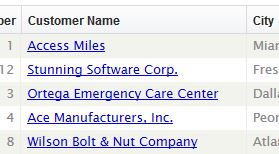
The value of the clicked column and the RowId of the clicked row are passed as parameters to the OnClick event that is triggered. In this OnClick event, the developer can implement custom actions, like drilling down to a details dialog or view.
Sample
This sample shows a data-aware cWebColumnLink object.
Use cWebColumnLink.pkg

Object oCustomer_Name is a cWebColumnLink
    Entry_Item Customer.Name
    Set psCaption to "Customer Name"
    Set piWidth to 100

    Procedure OnClick String sRowID String sCellValue
        // do something
    End_Procedure
End_Object
Drag and Drop Support
This control can be used as a valid drop target by registering it as such in a cWebDragDropHelper object.
The supported actions for this control are: - C_WebDropOnControl
This allows the control to accept data dragged from elsewhere in the control (if configured that way) and can also be used to accept files when registered within a cWebDragDropFileHelper.