Query Tester
You can use the Query Tester to execute and test SQL queries.
The Query Tester can execute and show the results of SQL queries.
The Query Tester can be opened:
- Using the Query Editor toolbar button
- By opening a
.sqlfile - By dragging a
.sqlfile into the DataFlex Studio - By right clicking inside an
@SQLstring in DataFlex source code and choosingOpen in Query Tester - By pressing
Alt+Q
Connection Id
Can be chosen from the active managed connections from the workspace as defined in the SQL Connection Manager.
Prepare
Used to prepare parameterized queries. When preparing a parameterized query the parameter panel will be shown, where values for the parameters can be entered.
The query can then be executed with the entered parameter values.
Parameters in a SQL query are marked with the $ sign and enclosed in curly brackets, for example ${param_name}.
Example
Select *
From Customer
Where State = ${State} and City = ${City}
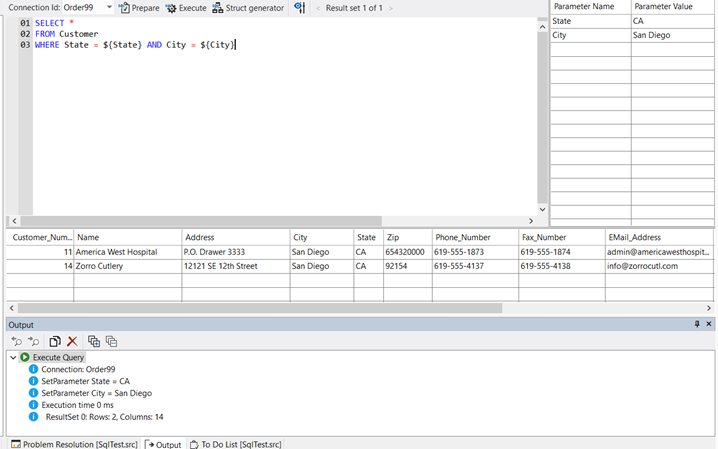
Execute
Will execute the query in the Query Tester editor.
If only some of the code in the Query Tester editor is highlighted, Execute will execute only the highlighted code.
Query results will be shown in each Query Tester's Results panel. Errors are shown in the Studio's Output panel.
Show/Hide Parameter Panel
Will show or hide the parameter panel in the Query Tester editor.
< Result Set x of Y >
Will scroll to the previous or next result set if multiple result sets are available for the current query.
Struct Generator
The Struct Generator creates a DataFlex Struct definition, that can be used in a program to execute a query and let the data be returned in a struct array.
Example
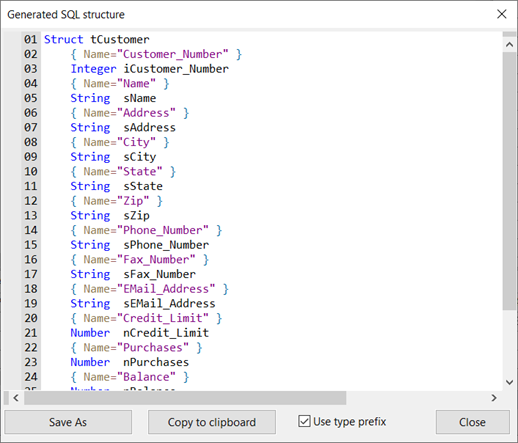
By default, struct member names will have a type prefix and a Name meta-data tag. When the Use type prefix checkbox is unchecked, the struct member names will have the name from the SQL query.
The default value for the Use type prefix checkbox can be configured on the Configure Studio Database tab.