Creating Workspaces
Workspace
A DataFlex Workspace is a physical and logical container for your projects, with a well-defined structure. A Workspace can contain multiple projects, typically related in some logical manner, such as a Windows application and a Web application that access the same database. A workspace contains everything necessary to build and run a DataFlex project.
Project
A DataFlex Studio Project is a collection of components and other items of interest to the Studio that compiles into a target program.
In this section, you will not create a new workspace. Instead, you will keep using the Quick Start workspace that was used for the Quick Start tutorial. To learn how to select the Quick Start workspace, see Opening a Workspace.
To learn how to create a new workspace, see Creating a Workspace.
Typical Workspace Structure
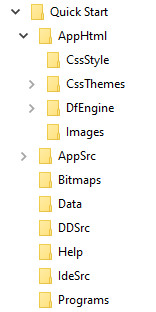
Each of a Workspace’s sub-folders contains files indicated by the folder name (e.g., application source files are in ..\Quick Start\AppSrc, data dictionary source files are in ..\Quick Start\DDSrc, etc.).