Runtime Errors
Operating, User, System, Utility, and Initialization errors fall under the category of runtime errors.
Runtime errors are those that occur when you are actually running a program (as opposed to compiling it). They are often due to operator error, such as failure to select or enter a valid value or failure to enter a value in a window that requires one.
Runtime errors can also be the result of a fault in a table definition, configuration of your operating system, or operator actions. However, many runtime errors result from a condition that has to be corrected in the program.
When this is the case, corrective action usually includes the same steps required to correct compiler errors: edit the program, make corrections, and recompile the program. Other steps may be required in addition to, or instead of, these steps.
Runtime Error Types
Runtime errors are divided logically into various groups, which are stored in different error tables supplied with DataFlex:
-
Operating System Errors and User Errors
These errors are in the 1-4096 range and stored inFlexErrs.dat. -
System & Program Errors
These errors are in the 4097-8192 range and stored inDfErr001.dat. -
Utility Errors
These errors are in the 8193-12288 range and stored inDfErr002.dat. -
Connectivity Errors
These errors are in the 12289-16385 range and stored inDfErr003.dat.
These error messages will vary with the database drivers you are using. The errors in the DataFlex SQL Error Class are documented here. -
Initialization Errors
The initialization errors are those in the error number range of 28673-32768 and are not stored in a database table but are instead embedded in the runtime. -
Web Application Errors
This section lists error messages that are specific to DataFlex web applications. -
Miscellaneous Errors List
Miscellaneous errors are some errors not stored in a database table but are instead embedded in the runtime or hard coded into the DataFlex packages (Class Library).
Error Message Display
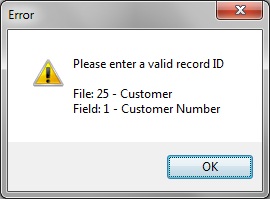
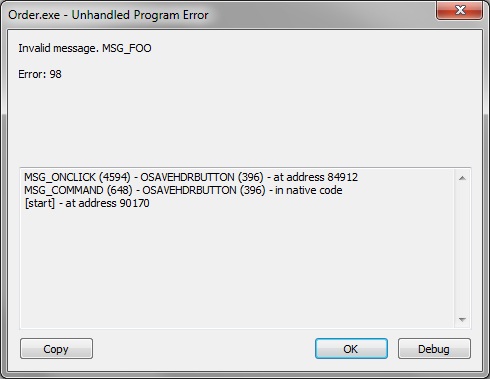
DataFlex Errors can be handled or unhandled. See the ErrorSystem class for a detailed explanation of handled and unhandled errors.
Handled errors are displayed like this:
Unhandled errors are displayed like this:
Fatal Errors
In some of the error message sections, you will see "This error is fatal." This means that this type of error will cause the application that triggered the error to abort.