Configure Workspace - Package Information
Use this tab page to configure the default settings to use when creating a package.
Version
The version of the package, identified by three numeric blocks:
- Major
- Minor
- Revision
Miscellaneous Settings
Other package settings
- Icon path (relative to workspace) - path and file name (.ico) used by the package
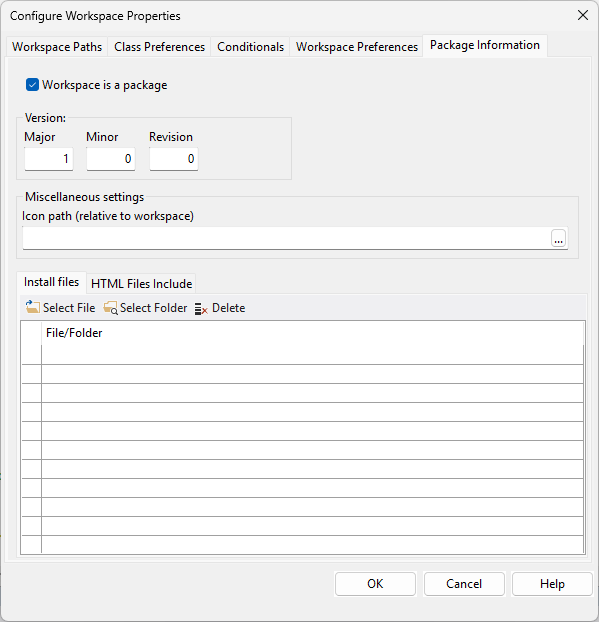
Install Files
Files that should be copied to the structure of a workspace using this package
- Select File - click on it to add path and file to the list. Each row will contain
\ . You may also select folder\file by using the prompt button in each row - Select Folder - click on it to add path to the list. Each row will contain
. You may also select folder by using the prompt button in each row - Delete - click on Delete to remove the entry from the list
HTML Files Include
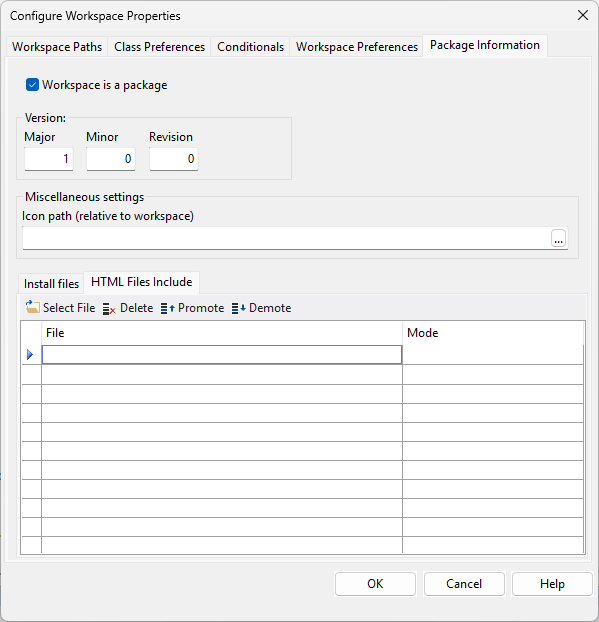
Web files (.js and .css) that should be installed with the package. Files must be in the package workspace's AppHtml folder
- Select File - click on it to add path and file to the list. Each row will contain
\ . You may also select folder\file by using the prompt button in each row - Delete - click on Delete to remove the entry from the list
- Promote - click on Promote to move the entry up on the list
- Demote - click on Demote to move the entry down on the list
Mode
Mode determines how the file will be processed, affecting HTML parsing (loading speed) and execution timing.
- Default - run/load immediately
- Deferred - download in the background, and pause parsing only to execute after the entire document is parsed
- Async - download in the background, but pause parsing to execute immediately upon download
Important! For local libraries, not Git or Cloud packages, these extra files (listed under Install Files and HTML Files Include) will need to be manually copied to the workspace as part of setting up the development environment.