Class: cSplitButton
Properties | Events | Methods | Index of Classes
Displays a split button, with an image and text on the left and a drop down image on the right
Hierarchy
cObject > cUIObject > DfBaseObject > DfBaseWindow > DfBaseUIWindow > DfBaseControl > DfBaseList > DfBaseButton > DfBasePushButton > Button > cSplitButton
Show full hierarchy and direct subclasses
Library: Windows Application Class Library
Package: cSplitButton.pkg
Description
This class displays a split button, where the left part of the button displays the image and text and the right side of the button displays a drop down image. If you click on the left, OnClick is called. If you click on the right, OnDropDown is called.
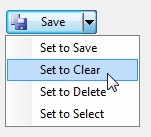
By default, OnDropDown will invoke a menu under the button determined by phoButtonPopup.
Windows only supports this style of button with Vista/Windows Server 2008 and above.; you would not want to use this with earlier versions. If used with a non-supported version of Windows, the right side split will not appear and you will not be able to invoke the OnDropDown event.
The Button class displays a button, with an image and/or text label, that executes an action when clicked.
The cCommandLinkButton class displays a command line button, with an image on the left followed by a large-text label with optional notes text underneath it in smaller text.
Sample
Object oButton1 is a cSplitButton
    Set Location to 69 77
    Set Label to 'Save'
    Set psImage to "ActionSaveRecord.ico"

    // fires when the button is clicked
    Procedure OnClick
        Showln (Label(Self))
    End_Procedure

    Object oButtonMenu is a cCJContextMenu
        Object oMenuItem1 is a cCJMenuItem
            Set psCaption to "Set to Save"

            Procedure OnExecute Variant vCommandBarControl
                Delegate Set Label to "Save"
                Delegate Set psImage to "ActionSaveRecord.ico"
            End_Procedure
        End_Object

        Object oMenuItem2 is a cCJMenuItem
            Set psCaption to "Set to Clear"

            Procedure OnExecute Variant vCommandBarControl
                Delegate Set Label  to "Clear"
                Delegate Set psImage to  "ActionClear.ico"
            End_Procedure
        End_Object

        Object oMenuItem3 is a cCJMenuItem
            Set psCaption to "Set to Delete"

            Procedure OnExecute Variant vCommandBarControl
                Delegate Set Label  to "Delete"
                Delegate Set psImage to  "ActionDeleteRecord.ico"
            End_Procedure
        End_Object

        Object oMenuItem4 is a cCJMenuItem
            Set psCaption to "Set to Select"

            Procedure OnExecute Variant vCommandBarControl
                Delegate Set Label  to "Select"
                Delegate Set psImage to  ""
            End_Procedure
        End_Object
    End_Object

    Set phoButtonPopup to oButtonMenu
End_Object
Windows Support
Windows only supports this style of button with Windows Vista/Windows Server 2008 and above. You would not want to use this with earlier versions. If used with a non-supported version this will appear as a big button and the notes will not be displayed.