Class: cProcessStatusPanel
Properties | Events | Methods | Index of Classes
Supports a visual object to displayed by long-running processes that may be unattended to report errors that arise in the job
Hierarchy
cObject > cUIObject > DfBaseObject > DfBaseWindow > DfBaseUIWindow > DfBaseContainer > DfBaseDialog > DfBasePanel > DfBaseToolPanel > FloatingPanel > cStatusPanel > cProcessStatusPanel
Show full hierarchy and direct subclasses
Library: Windows Application Class Library
Package: cProcessStatusPanel.pkg
Description
This is the class used to create Status panel objects in Windows applications.
Use SetActionMode for Web applications.
This class does not provide any of the inner objects that make up a status panel. Instead an interface is provided that is used to update the various areas of status panel. At this level, those areas (title area, message area, action area, button area) are logical. You create the physical objects at the object level and then bind these objects to the interface.
Take a look at StatPnl.pkg to see how this is used.
cProcessStatusPanel is used to support a visual object to be displayed by long-running processes that may be unattended (batch processes) to report errors that arise in the job, the proportion to which the job is complete from time to time, and other information of potential interest to users running such jobs. This class supports the display of "host/sentinel" monitoring.
Syntax
Use cProcessStatusPanel.pkg
or
Use StatPnl.pkg
If you Use StatPnl.pkg, an object of this class named Status_Panel is instantiated automatically by any program that uses its package. The object's behaviors are controlled entirely by messages sent to it. The global variable ghoStatusPanel can be used in place of the object name (Status_Panel). This provides a cleaner more robust interface.
Usage
:
Procedure theProcess
    String sMyCaption sDialogTitle sLongerMsg
    String sProgressString
    Boolean bUserCancel bDone

    Send Initialize_StatusPanel of ghoStatusPanel sMyCaption sDialogTitle sLongerMsg
    Send Start_StatusPanel of ghoStatusPanel
    Repeat
        :   //process batch item(s)
        Send Update_StatusPanel of ghoStatusPanel sProgressString
        Get Check_StatusPanel of ghoStatusPanel to bUserCancel
        :
    Until (bDone or bUserCancel)
    Send Stop_StatusPanel of ghoStatusPanel
    :
End_Procedure
Notes
The status panel is used to create an interruptible progress dialog to be used during modal processes like report and batch processes. The panel is defined by setting the contents of several displayed areas:
| Col 1 | Col 2 |
|---|---|
| Caption bar | The value in the caption bar |
| Title | A centered title that appears inside the dialog |
| Message | A longer message that appears below the title |
| Action | An area below that message that is used to display progress |
| Button | A Cancel button that appears below the display |
When running, a status panel looks like the image (by default). You can see where each area is defined.
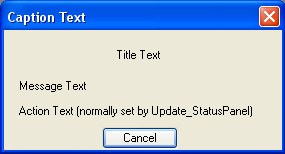
You can change the default size of the status panel by setting it before calling Start_StatusPanel. You can also resize the status panel while running.
All the properties of this class are defined and set in the class. They cannot be changed in programs except by sending messages to the object.
See Also