Compiling and Testing Your First Web Service
Now, let's test the Greeting Web Service function you have just created.
-
Click on the Run button on the Studio's toolbar.
-
The application should automatically load in your default browser and display the page below, with a link to the Greeting Web Service. Click the Greeting Web Service link. Your browser will now show the
GreetingService.wsopage:

There are a number of things to note on this page:
- The page that is used to access this Web Service (http://localhost/GreetingWebService/GreetingService.wso) is determined by the
psServiceNameproperty of the WSO that you set in the Studio's properties window. - The title "Greeting Web Service" is the value of the WSO's
psServiceTitleproperty. - The description of the service, right beneath the title, is the value of the WSO's
psDocumentationproperty. - The list of operations is created by an enumeration of all published functions in your WSO. In the case of our Greeting WSO, Greeting is the only published function.
-
The description below the Greeting function is the description you typed into the "Method Properties" dialog in the Studio.
-
Click on the Service Description link to see the WSDL document for this service. This WSDL (http://localhost/greetingwebservice/greetingservice.wso?WSDL) is what is used by client programs to consume (access) this web service. You will use this URL in the next tutorial section on the Creating a Web Service Client Class page.
When you are done viewing the WSDL, click on the Back button of your browser to return to the WSO page for your Web Service.
Testing Your Web Service
- Click the Greeting link to load the test page for the Greeting function. You should see the following page:
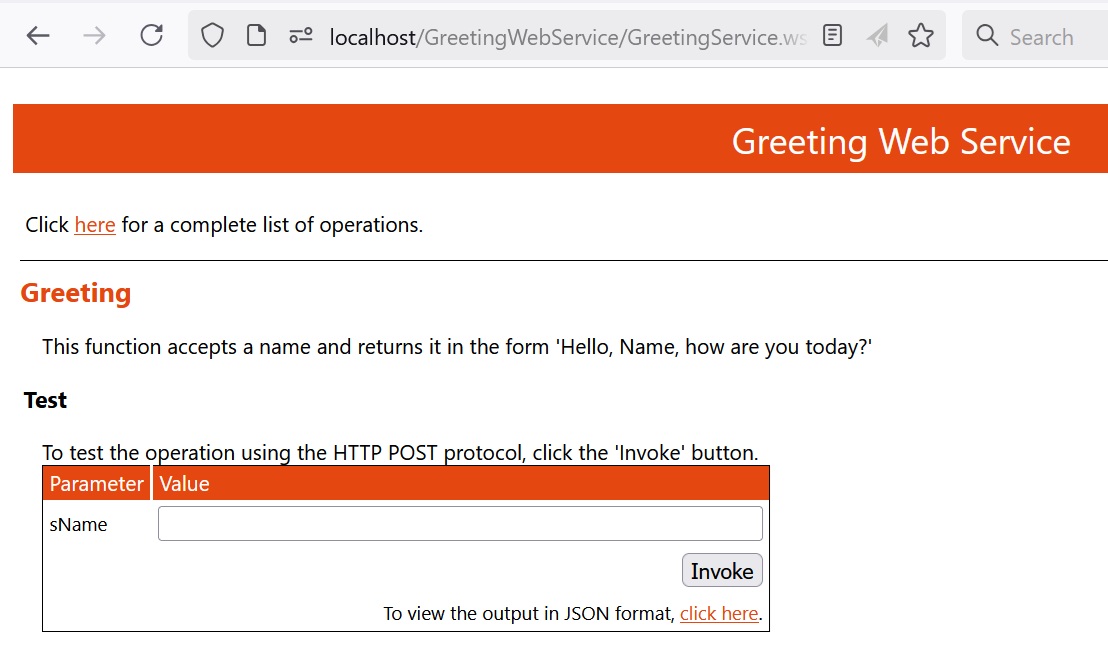
On this page, you can actually test your web service's functionality. The Studio has created the page for you to test calling the Greeting web service function.
Web Service Test Page
The test page that DataFlex Studio creates for your Web Service is just that, a test page. Normally, a Web Service function is called from a Web Service client without any visual interface. The test page provides a quick and simple way of testing your Web Service's functionality without having to create a client for it.
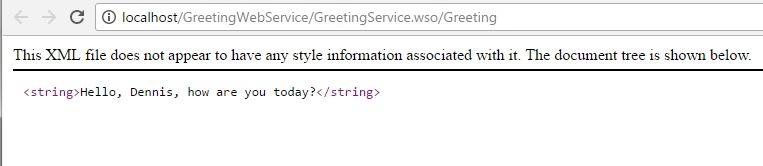
- Type your name into the sName window and click the Invoke button. Another web page should open, displaying the result of the Greeting function:
The Web Service you have just created could now be placed on a Web server and accessed by Web Service clients designed in any tool that supports web services anywhere in the world.