DF_FIELD_NATIVE_TYPE_NAME
The name of the native type of a column.
Level
Column
Supported by
The DataFlex SQL Drivers (SQL Server, DB2, and ODBC), revision 3.0 and higher.
- Microsoft SQL Server-specific types are supported in the SQL Server Driver revision 6.0 and higher. See the full list of supported types and type mappings for Microsoft SQL Server here.
- IBM DB2-specific types are supported in the IBM DB2 Driver revision 6.0 and higher. See the full list of supported types and type mappings for IBM DB2 here.
Type
String, permanent
Access
Read / Write
Values
A string containing the column name.
Syntax
Use cli.pkg
Get_Attribute DF_FIELD_NATIVE_TYPE_NAME of {tableNumber} {columnNumber} to {StringVariable}
Set_Attribute DF_FIELD_NATIVE_TYPE_NAME of {tableNumber} {columnNumber} to {StringVariable}
Remarks
This string attribute can be used to fine-tune native type settings. It is possible that more than one type uses the same type identifier (DF_FIELD_NATIVE_TYPE). This is the case for identity types and user-defined types. In these cases, one can use the DF_FIELD_NATIVE_TYPE_NAME to specify the exact mapping. You must set this attribute to the exact type string used by the back-end (the value is case sensitive).
This is a permanent attribute that can only be set inside a Structure_Start ... Structure_End operation.
In SQL Server, for example, one can define additional types and bind rules to a user-defined type. It is possible to define a type to store information and add a form of validation to the database server by creating a rule for the type. One could, for example, create a type and accompanying rule for storing Dutch zip codes.
A Dutch zip code is a four-digit number followed by a space followed by two uppercase characters. In order to define this type, define the rule in SQL Server Enterprise Manager as follows:
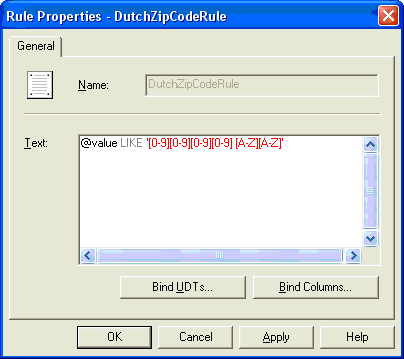
Then create the type in Enterprise Manager as follows:
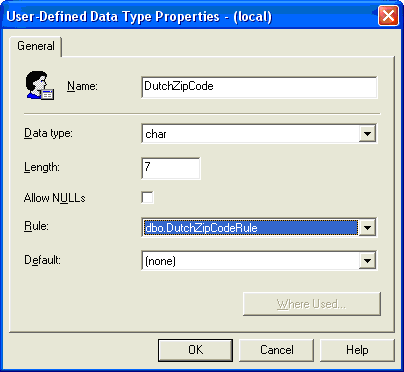
This type "DutchZipCode" can be used in table definitions like:
Procedure ChangeZipCodeColumn Handle hTable
    Integer iNumColumns
    Handle hColumn
    String sName
    Structure_Start hTable
        Get_Attribute DF_FILE_NUMBER_FIELDS Of hTable To iNumColumns
        For hColumn From 1 To iNumColumns
            Get_Attribute DF_FIELD_Name Of hTable hColumn To sName
            If (Uppercase(sName) = "ZIPCODE")
                Set_Attribute DF_FIELD_NATIVE_TYPE_NAME Of hTable hColumn To "DutchZipCode"
            Loop
        Structure_End hTable
End_Procedure
If one tries to save invalid data into the column of type DutchZipCode, SQL Server will generate an error.