DataFlex 2026 Alpha 2 Release Notes
This page lists the specific list of changes in DataFlex 2026 between Alpha 1 and Alpha 2.
See What's New in DataFlex 2026 for all new features in DataFlex 2026.
Compatibility Notes
cIniFile New Class Implementation
The cIniFile class has been rewritten. It now does not rely on the old Windows APIs that were originally designed to work with the registry and had some Unicode issues. The cIniFile class is intended to be backwards compatible. Its new base cIniProcessor class does the actual lifting.
Note that when reading or writing multiple values / sections, it is now more efficient to use the cIniProcessor APIs directly as it reads and parses the whole INI in memory and then writes it out again. Use ParseString or ReadFromFile to load ini data, use Stringify or WriteToFile to generate / save the data. Use functions like SetValue and GetValue to read / manipulate values.
Note that the class assumes INI files to contain UTF-8 data and ignores BOM values when reading.
Codejock controls have been updated from 24.2.0 to 24.3.0
There should be no impact on compiling your programs, but we encourage you to test your Windows applications.
DfComp and DFCompConsole will be removed in Beta
If you use dfcomp or dfcompconsole, make sure to read about and test their replacement, df-cli. dfcomp and dfcompconsole do not understand the new workspace file format and will be removed in beta.
Known Issues
Import Studio Preferences not enabled
We are aware that the import capability is not available. We are working on a new feature that addresses that issue and gives developers more flexibility to transfer Studio settings from previous environments.
New Features and Updates to New Features
Package Manager
Packages are now required to have licenses.
Package creators are now forced to provide/chose a license. This is to protect all parties' legal obligations. In the Studio or SWS file (package."license", package."licenseFile"), you can set a license that applies to the current package.
Licenses are based around the SPDX standard (https://spdx.org/licenses/). The license attribute even allows you to specify an SPDX expression like "MIT OR 0BSD" if need be. But in most cases, a creator will specify one license or provide a custom one. This means that the "license" attribute needs to specify a licenseId in the SPDX list. This is different from the visual name. You can also specify a custom license ("DocumentRef-${name}" or "LicenseRef-${name}"), but you are then forced to provide a license file.
For anyone who doesn't know what they are doing, the Studio provides you with the tools and if you don't know what license to choose, a good fallback is "MIT" or "ISC", which protects you from any responsibility. During configuration or from GIT you are warned if we could not find a valid license. Only when pushing to the cloud servers is it required.
Additional Changes:
- Security improvements in all layers of the Package Manager.
- SWS and Config.ws files are now updated instead of rewritten from scratch (json style SWS files won't parse comments).
- A sws.lock.sws is now created to lock down on git branches and version expressions on dependencies.
- Held back packages have been formally added. When using an expression or in the case of pre-releases, they are marked as held back. This means they won't show up as updates, as they don't meet the requirements of any other dependencies you are using or otherwise.
- We've made changes in the Studio interface to provide for the metadata and license info.
- df-min and df-max have been removed, this is now handled by the cloud server.
- Package Manager now has dynamic metadata, every undocumented member in the package member is now considered as part of this dynamic metadata.
- Packing now has support for all official DataFlex extensions in the AppSrc folder.
- Added an "includeFiles" and "excludeFiles" property in the SWS file that allows adding additional files to the packing. This is for the case where you wish to add files, but not install them to the root workspace.
- The Package Manager web site now supports deleting of unpublished versions or published versions with no downloads. Later this will need to be done within a 72 hour window.
- Search form in the studio properly backspaces the last character now.
- Made all workspace paths multi-supported except for ConnectionINI, FileList, AppHtml, and IdeSrc.
- Restored Config.ws Home having a backslash and the others with none. Other content is being kept.
The WebApp Framework is now a Package!
The WebApp Framework has been taken out of the core product and is now provided as a set of packages. This will allow Data Access to push updates and fixes between releases and let developers decide when they want to update for each individual workspace.
The main packages are Web UI Server for regular WebApps using the WebApp Framework and Web UI FlexTron for Windows Apps. The themes are installed using separate packages like Web UI Material Theme and Web UI Flat Desktop Theme. A helper dialog is added to the Studio that comes up automatically when the old JavaScript Engine is detected in a workspace. It will help with the necessary migration steps.
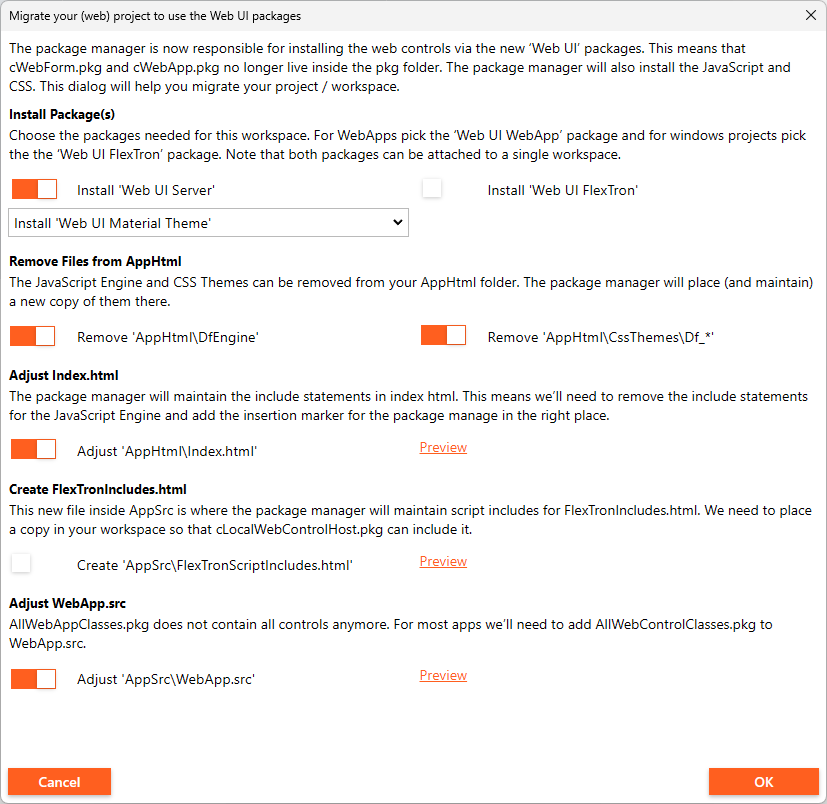
Migration steps include attaching the packages, cleaning out files from the AppHtml folder and adjusting Index.html. The Package Manager will be responsible for maintaining the script includes inside index.html. For FlexTron, the Package Manager will look for a new file called FlexTronScriptIncludes.html located inside AppSrc to place its script includes. Note that the Package Manager will include a version ref in the script include to overcome caching issues.
Packages that contain Web Controls should mark the Web UI package as a dependency to make sure the inclusion order is correct. The best way to do this is to use a SemVer expression, so that it allows any version (or a minimal version) of the framework. Type the following string in the Package Manager's Add Package dialog "Web UI#>=1.0.0" to make sure the JavaScript Engine is included before the JavaScript of your control in index.html.
Install the packages from the Package Manager Server to get web framework files you need for your web applications:
- Web UI Server - https://packages.dataflex.dev/#Packages/Package-38
- Web UI Flextron - https://packages.dataflex.dev/#Packages/Package-39
DataFlex Command Line Interface (df-cli.exe)
'df-cli build' replaces dfcomp and dfcompconsole
Building outside the Studio is now done using the df-cli build and build-file commands. This replaces dfcomp and dfcompconsole, which do not understand the new workspace file format and will be removed in beta.
Using a renewed interface, it will become easier to initiate builds of files and entire workspaces. The build-file subcommand partially represents the old idea of initiating a compile of one file, while adding a workspace for the additional include paths.
The build subcommand works the opposite way and is now the recommended option. You provide a workspace and then tell df-cli what "target" you wish to build. If no target is provided, all targets in the workspace are built. --rebuild forces a recompile equivalent to the previous -c.
The CLI can build workspaces from 19.1 upwards if the compiler is installed for those versions.
See details of the df-cli command line interface here.
Bug Fixes and Improvements
Compiler
- DataFlex executables are now reproducible. Each compile should create the same result, assuming the content of your application has not changed. Should help with testing builds against anti-virus checks.
Documentation
- Added Activation Information to the Help (in the Installation and Environment Guide)
- Improved Connect function description and added example to its Help page
- Added documentation for Navigation Designer 'Toggle all' button on field selector
- Corrected the description of iErr and examples for LogErrorEvent procedure
- Documented functions IsManagedConnection and TableConnectionID in cConnection class
- Corrected typo in the example code on cWebMultiSelectList page
Packages
- Corrected cWebView2Browser's prZoomFactor function that would always return 0
Studio
- Added a vertical splitter in the Studio DD modeler to better accommodate long field names
- The Studio does not allow changing read-only files anymore. This is to prevent users from force editing DFPkg files
- Fixed Studio not being able to load workspaces that had a minor version (20.1 as example)
- Fixed wizard preview not working in mobile wizards
- When nothing is selected, pressing Ctrl+C in the Studio now clears the clipboard
- Create New descriptions can now be in HTML format, and thus the Studio now sanitizes decription input
- Applied a more unified look throughout the Studio for things that use Web controls, such as Package Manager, Navigation Designer, Create New, Excel Import Wizard
- Added license selector and custom license file selector to Configure Workspace
- Added prerelease form to Configure Workspace dialog (with semver check for accepted version of dependencies)
- Improved Excel Import Wizard design
WebApp Framework
- Controls that augment mouse wheel events were adjusted to respond on Firefox the same way as on other browsers
- cWebForm with peLabelPosition set to lpFloat now properly floats the labels when the content is auto-filled by the browser.
- Optimized web framework object serialization for efficiency