DataFlex 2023 Beta 2 Release Notes
This page lists the specific changes in DataFlex 2023 between Beta 1 and Beta 2.
See What's New in DataFlex 2023 for all new features in DataFlex 2023.
See DataFlex 2023 Beta 1 Changes for the specific list of changes in DataFlex 2023 between Alpha 2 and Beta 1.
See DataFlex 2023 Alpha 2 Changes for the specific list of changes in DataFlex 2023 between Alpha 1 and Alpha 2.
See Bugs Fixed in DataFlex 23.0 for bugs fixed and improvements implemented in DataFlex 2023.
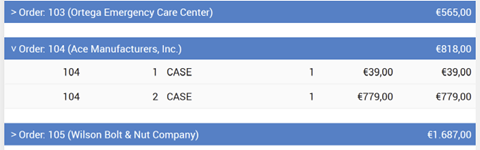
Collapsible WebList Groups
Groups in WebLists can now be collapsed and expanded. The property pbGroupsCollapsible controls if groups can be collapsed, while pbGroupsCollapseByDefault determines if groups show collapsed by default.
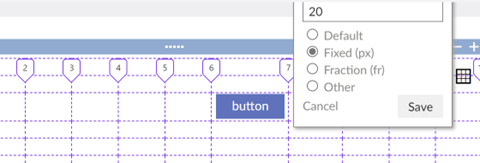
Resizable Columns in Grid Layout
The width of columns within the grid layout mode can now be customized using psColumnWidths. Just like with row heights, the widths can be set in pixels, fractions, or custom CSS grid values. Use the designer to configure the widths by dragging the column handles.
Other Improvements
Web Framework
- Fixed WebApp Framework deep link reinitialization issue.
- Added a
NavigateInfofunction that allows developers to retrieveWebRegisterPathinfo at runtime. - General improvements to the Web Designer in respect to the new Grid Layout.
- Improved keyboard selection in the new
cWebMultiSelectList. - Enhanced Studio's recognition of
Include_Textstatements in the Code Explorer. - Fixed multiple issues where the
cWebTagsFormdid not respectpbReadOnly. - Resolved an issue where the
cWebTagsFormloaded a filtered version of thecSelectionSourcewhen the data mode was set topbAllData. - Fixed an issue where the
cWebListmight throw an error due to a missingiGroupHeaderIndexmember. - Corrected an issue where the Web Designer incorrectly resized a WebList’s columns when set to
pbHiddenat design-time. - Fixed an issue where the Web Designer did not allow selection of a button with
pbEnabledset to False. - Resolved an issue where the tablet mode of the Material theme had undersized rows compared to the currently focused row in a
cWebGrid. - Fixed the
OnSyncWebAppmessage not being sent. - Fixed
cWebDynamicObjectContainerwhich was not serializing columns of thecWebList. - Fixed
cWebMultiSelectListwhich was broken by the new grouping feature. - Fixed horizontal sizing issues of controls in the WebApp Framework due to label and grid layout changes.
- Resolved container sizing issues and improved
pbScrollin the WebApp Framework. - Fixed
cWebListphoKeyBuddyissue. - Corrected row ID conflict issue in
cWebListinsidecWebListExpandPanel.
FlexTron
- Improved focus behavior of FlexTron controls.
- Fixed errors when using
cWebIFrameand DataFlex Reports Previewer with FlexTron. - Added
cWebRadiosupport tocLocalWebControlHost. - Fixed
cLocalWebControlHostnot responding to ClientActions likeDataSetAppendRow(cWebList).
Connectivity
- Fixed issue where a Find after
Fill_FieldDF_LOW/DF_HIGHwould sometimes find the wrong record. - Resolved issue when a named parameter was used more than once in the same query.
SQLExecutordid not collect data fromVarChar(max)columns.cSQLExecutornow respectsRedirectConnectionIdchanges.cSQLExecutornow has apsDriverIdproperty.
Studio
- Numerous fixes and improvements to grid layout handling in the Web Designer.
- Refined Query Tester refreshing of combo, enabling buttons, and messages for queries.
- Studio Wizards now use more translated string constants.
- Reduced flashing of the studio output panel.
- Fixed bug causing the studio to generate registry keys for every file once opened.
- Fixed errors when using
Ctrl+Cto copy on Query Tester output grid. - Improved DPI scaling of COM Classes list and Library Maintenance screens.
- Fixed error while importing Studio preferences.
Runtime
- Fixed the expression evaluator precedence issue.
Registration
- Manual Activation: Added the ability to activate DataFlex licenses manually to support running DataFlex on PCs without internet access.
Database Builder
- Fixed ComboForm sizing in overlap boundaries dialog where controls overlapped each other.
Examples
- The example workspaces were restructured:
- Combined Order Entry and Order Entry Tab.
- Structured Specialized Components’ projects in subfolders.
- Moved Web Services Clients to Specialized Components.
TabbedOrder.srcnow includes new Codejock Commandbars Themes available in Codejock 22.0.0.
Miscellaneous
- Fixed the
SourceToUtf8utility crashes and made several improvements.