DataFlex 2023 Beta 1 Release Notes
This page lists the specific changes in DataFlex 2023 between Alpha 2 and Beta 1.
See What's New in DataFlex 2023 for all new features in DataFlex 2023.
See DataFlex 2023 Alpha 2 Changes for the specific list of changes in DataFlex 2023 between Alpha 1 and Alpha 2.
WebList Grouping
The cWebList class now supports grouping of data. When enabled, the user can configure the groups via the context menu on the header of the list.

To enable grouping, the WebList must be set to load all data to the client (peDbGridType = gtAllData and peDbGridType <> gtManual), and then peGrouping can be set to grpAutomatic. By default, configured groups are stored in local storage so they can be restored after a page reload. This behavior can be configured and customized using properties and events.
The automatic grouping happens on the client in JavaScript. Manual grouping can also be performed by setting peGrouping to grpManual. When this is done, groups can be created from OnManualLoadData by filling in the aGroups and aGroupHeaders arrays.
The WebOrder and WebOrderMobile sample workspaces contain grouping samples under the Demo menu.
Web Grid Layout
The grid layout is a new layout system now available for web applications. It provides more control over the vertical positioning of your controls and is based on the CSS grid layout.
To use this new layout type, change the peLayoutType property to ltGrid on any container (cWebView, cWebPanel, cWebGroup, cWebTabContainer, etc.). The piRowCount and psRowHeights properties allow you to configure a grid to which controls can be snapped. Note that the Studio's WebApp Designer will help you with this.
By default, the peLayoutType property value is inherited from parent containers, but the flow layout and the grid layout can be mixed within applications and views.

FlexTron
A new project template is now available for creating FlexTron Applications. When using this template, the Studio will also support creating/adding web views.

Support for ODBC Driver 18 for SQL Server
As of DataFlex 23.0, we support ODBC Driver 18 for SQL Server. The DataFlex SQL Server Driver (MSSQLDRV) 23.0 will now recognize and support ODBC Driver 18 for SQL Server.
ODBC Driver 18 for SQL Server has a breaking change, where the default value of the "Encrypt" connection option changed from optional/no to mandatory/yes.
When migrating from ODBC Driver 17 for SQL Server or earlier, the changed default encryption error may result in the following error:
[Microsoft][ODBC Driver 18 for SQL Server] SSL Provider: The certificate chain was issued by an authority that is not trusted.
The SQL Connection Manager in DataFlex 2023 Studio now has encryption settings that can be set to send data encrypted and/or check certificates.
Other Improvements
SQL Query Executor
- Improved support for multiple fields with the same name.
- Fixed issues with empty result sets and the number of columns reported in the output panel.
Studio
- The icons now contain larger sizes for high DPI screens. This especially shows when running the studio at 200% or higher.

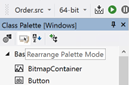
- Added tooltips to the buttons in Class Palette.
Studio Query Tester
- The struct generator better handles characters that are invalid in DataFlex, generating an output that will be compatible with language requirements.
- Query results area shows ‘no results’ instead of an empty grid for queries without a result set.
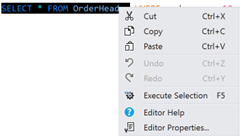
- Selections can be executed from the Query Tester context menu.
Language
Add new items to dynamic arrays using the Move item to aArray[-1] notation.
Procedure Example
    String[] Sentence
    Move "The" to Sentence[-1]
    Move "quick" to Sentence[-1]
    Move "brown" to Sentence[-1]
    Move "fox" to Sentence[-1]
    Move "jumps" to Sentence[-1]
    Move "..." to Sentence[-1]
End_Procedure
Compiler
By default, the Compiler Warning “AmbiguousFunctions” has been turned off. The reason for this is that it might not be an issue at all until you use them in an expression. For that behavior, you will now get an Error instead of a Warning as it creates undefined behavior.
Bug Fixes
FlexTron
- Fixed ‘Unable to show view without provided render object’ error when there was no panel in
cLocalWebAppHost. - Fixed issue with web context menu inside a
cLocalControlHost.
Studio
- “Open in Query Tester” menu item now works correctly. Before, it would not allow on specific parts of the SQL string or bring in quotes.
- While pasting foreign DataFlex code with strings in them, DataFlex keywords might get capitalized, causing issues when pasting, for example, “function” JavaScript code (only in multiline strings).
- Allowed for the EXE 64-bit suffix to be empty in the Studio configuration.
- Database Login dialog can better accommodate connection strings.
- Improved automatic name for structs created by Query Tester struct generator.
WebApp Framework
- WebColorPicker: When changing a color in the color map, the value of the
psValueproperty would not change. - WebContextMenu:
- Now works in FlexTron (-LocalControlHost) environments.
- Has the ability to handle child objects as part of its scope (
pbChildScopes).- This means you can handle multiple objects with the same Context. Previously, you would have to create the same menu for each control.
- The added function “ContextScope” returns the Object handle of the Scope/Control that the menu appeared for.
pbChildScopesis not allowed forC_WebUIContextListHeadas it could modify the menu items.
- WebList: Layout caches are now invalidated if the object name changes or if a new column is added/removed.
- WebMultiSelectList:
pbKeyboardSelectiondid not disable Ctrl/Shift clicks. - WebApp Server: Support setting an application server to weight 0 in an SPLF environment to disable the node.
- Dynamic object container mixed up the order of child objects (list columns).
Runtime
Readlncommand would not read more than 65535 characters.
Multiline Strings
- Fixed multiple issues with the new aligned version:
- The compiler might get stuck or otherwise.
- Fixed
For_Allcommand (it wouldn't compile). - Fixed an issue in which big multiline strings caused issues in precompiled headers.