DataFlex 2021 Beta 2 Release Notes
DataFlex 2021 - 20.0 Beta 2
Product Identity
In anticipation of releasing what we have been calling DataFlex 2020 early in the coming new year, the full release of our 64-Bit, Unicode product will debut as DataFlex 2021. You will see the DataFlex 2021 nomenclature here in the Beta 3 release.
Unicode and 64-bit
DataFlex 2021 is 64-bit capable and fully Unicode, unlocking the power of 64-bit environments and supporting multiple languages in a single application. We recommend that you review the information in these sections:
...and then follow the step-by-step recommendations in Working with DataFlex 2021.
Note that Unicode support is available for all types of DataFlex Web Applications, including ASP Classic.
Compiler Warning System
The Compiler Warning System in the DataFlex 2021 Studio is more flexible and contains new warnings for the declaration and use of ambiguous functions. All warning categories can now be turned on and off with the CompilerLevelWarning command, which allows you to focus on the various categories one at a time, or in groups. This is especially useful when you want to focus on specific goals, like Unicode compatibility or cleaning up the use of ambiguous functions in your applications.
Studio Dark Theme
We've added a Dark Theme to the DataFlex Studio!

You can try the new theme by selecting the Dark Theme option from the Tools menu...
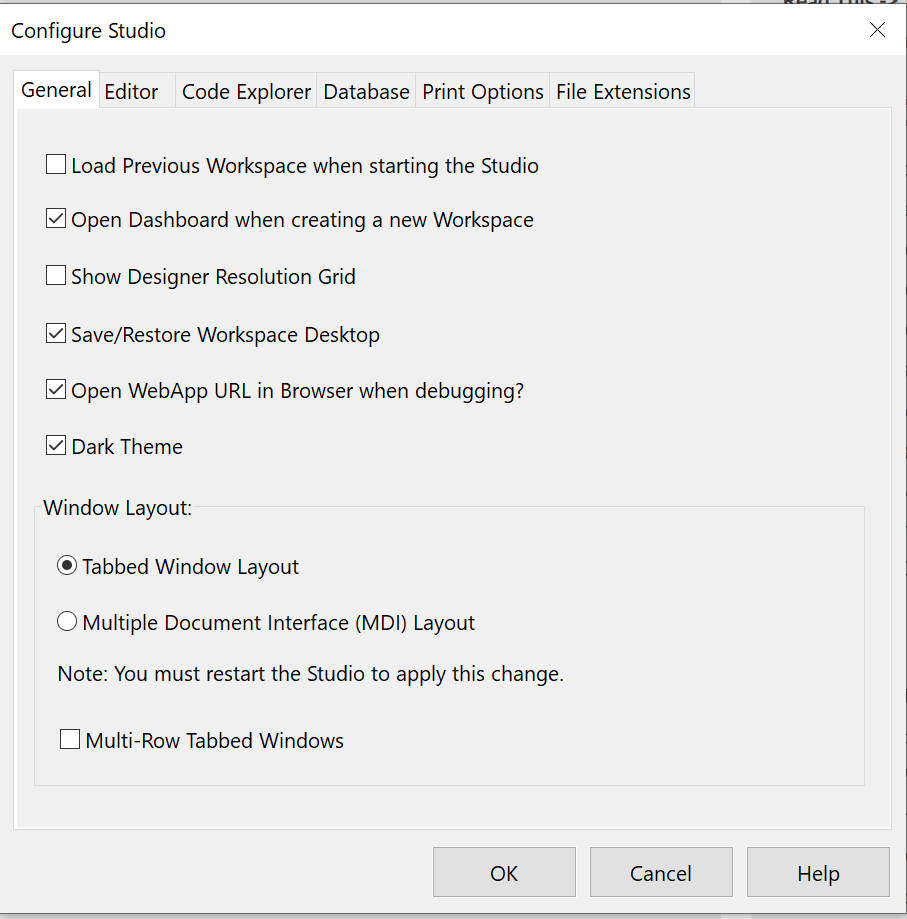
Note that the Studio allows you to hot-switch between the Dark Theme and the standard theme, but we still have some cleanup to do along these lines. During Beta, we recommend you restart the Studio after changing between themes. The new icon set for the Dark Theme is not yet complete, so some of the icons still look "boxy".
Connectivity
DataFlex 2021 Beta 3 contains the re-engineered SQL drivers for Microsoft SQL Server, IBM DB2, MySQL, and other back-ends supported through ODBC. Beta 3 also includes a 64-bit version of the PSQL (Btrieve) driver. This driver does not add any Unicode support and runs through the same compatibility layer as the Embedded Database driver. We continue to investigate the feasibility of adding Unicode support to the PSQL driver.
When working with various SQL back-ends, it's important to understand how each one deals with Unicode. The Working with DataFlex 2021 section covers Microsoft SQL Server in detail, but we've created a series of guides for other SQL environments:
- How to set up and test using IBM DB2
- How to set up and test using MySQL
- How to set up and test using PostgreSQL
- How to set up and test using MariaDB
- How to set up and test using Oracle
As you convert your data and experiment with Unicode in your chosen SQL environment, pay attention to these important concepts:
- Database Drivers in DataFlex 2021
- Table Character Format in DataFlex 2021
- Padding and Trimming in SQL Databases
- The N Prefix in SQL
The updated drivers also reduce the default memory used in Web Applications. See "Memory Use in DataFlex Web Applications".
New Features in DataFlex 2021
DataFlex 2021 adds exciting capabilities and classes to the Web Framework:
New in Beta 2
- Improved masking logic with Android support.
- Improved WebTagsForm.
- Bug fixes.
New in Beta 1
- New cWebTagsForm - This new control looks like a standard web form, but it allows the selection of multiple items. These items are visually represented by boxes/balloons called tags. Selection is done by typing text into the form and, optionally, a list of items to select from is displayed.
- There is a demo view using WebTagsForm in the WebOrder example.
- Enhanced security on hidden and disabled objects. A new layer of security checks is added that validates if UI objects are actually displayed (pbRender, pbVisible) and enabled (pbEnabled) before performing operations on them. This prevents unwanted exposure of data and prevents unallowed operations from being performed. A new web property type called ClientProtected is added to support this.
- See Enhanced Security in Web Framework Applications for complete details.
- The SetCookie procedure now has support for the samesite attribute. The WebApp Framework has a new psSessionCookieSameSite property to configure this behavior. This resolves the samesite warnings in Firefox.
- Use inputmode to show numeric keyboard instead of input type=numeric. cWebForm now uses the inputmode attribute to determine what keyboard should be displayed on touch devices. The support for this attribute is growing where the type=number support seems to get worse. This new attribute is also a better fit for how the framework handles masking. The pbHtml5NumberOnMobile property is removed and replaced with the new psInputMode property.
- Improved cWebProgressBar pbShowPercentage support in Df_Material theme.
New in Alpha 2
- New OnCollapse & OnExpand events in cWebGroup.
- New pbAutoTab support in cWebForm.
- UnSyncWebProperty for client web properties.
New in Alpha 1
- Dynamic Web Objects are created at runtime, not hard-coded in the application. Their definitions may come from the database and their use is centered around UI objects (controls). Dynamic objects are useful for user-configurable dashboards, questionnaires, or anywhere you can't predetermine the exact object structure.
- The Web Order example has a dynamic objects demo.
- The cWebHTMLList class shows lists of data using custom HTML formats.
- The Web Order Mobile example uses this new class in the dashboard.
- The cWebGeoLocation class queries the current location (using GPS coordinates) by wrapping the HTML5 navigator.geolocation API and supports both single query and tracking.
- The Web Order Mobile example contains a GeoLocationAPI Demo.
- The framework now fundamentally uses the cWebHttpHandler instead of cWebService, which provides more flexibility in the JSON format and removes the need for valuetree.
- Additional client web properties of type number and date.
General Improvements
DataFlex 2021 includes improvements to how web applications are managed that are not specific to the Unicode and 64-bit capabilities that are the main thrust of the new release:
- Maximum concurrent sessions limit per WebApp – developers can now set the “Maximum Concurrent Sessions” per web application instead of per server instance.

- Improved automatic re-load of process pools – in prior revisions, when the WebApp server automatically restarts an app, or the size of the process pool is changed, all processes in the pool are stopped and then restarted. In DataFlex 2021, the server will now stop each process one by one and start a new one until the entire pool is refreshed.
- Improved logic when a process is in an error state – In prior revisions, when a WebApp process is in an error state, the next incoming request is affected by this. When attaching to a process fails (can have multiple reasons), an error is sent back to the client even though the cause of the error usually is unrelated to the request. In DataFlex 2021, when this happens, the server will assign the call to the next process in the pool (if available) to retry. Situations in which this can happen are unresponsive processes, connection lost, and attached state invalid. Note that this automatic assignment to the next available process can only be done if no DataFlex code of the application has been executed.
- Run WebApps under specific user accounts – developers can now specify which user account any web application should run under. See the screenshot of the updated WebApp properties panel above.
- Maximum processes per application server (slave) in SPLF configurations – in prior revisions, the process pool settings were configured at the web server (master) and then those were spread among the available application servers according to the weight ratio. If an application server was removed or failed, the processes would be redistributed over the remaining application servers without any consideration to the load (or licensing) on the remaining application servers. In DataFlex 2021, developers can now set a maximum pool size for each application server (slave) that will not be overridden by the pool settings at the web server (master).
- Fixed issue that disabling a web app in the administrator asked for a restart.
- Enforce the maximum number of licensed web applications for Application Servers.
- Enforce the maximum number of licensed Application Servers for DataFlex Web (SPLF) Servers.
- Improved communication between Web Servers and Application Servers regarding updates on running & stopped processes.
Note: We are still in the process of changing the Web Application Administrator interface to accommodate these new features (such as displaying the user account along with other application-specific information). Also, if you change these new settings, you should restart the web application manually (this will be made automatic in future updates).