Timer Event
See Also
- TaskDialog Control
- EnableCallbackTimer Property
- SetProgressBarRange Method
- StartProgressBarMarquee Method
- ProgressBarStyle Property
- ProgressBarPos Property
- TaskDialogProgressBarStyle Enumeration
Description
This event is sent by the Task Dialog approximately every 200 milliseconds when the EnableCallbackTimer property has been set.
Syntax
Public Event Timer( _
    ByVal [MilliSeconds](#) As Long, _
    ByRef [Reset](#) As Variant _
)
Parameters
- MilliSeconds: Number of milliseconds since the dialog was created or Reset was set to True.
- Reset: True to reset the tick count; otherwise, the tick count will continue to increment.
Remarks
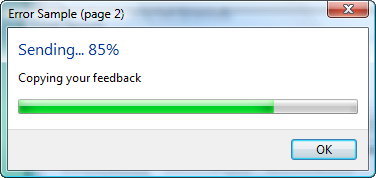
When EnableCallbackTimer is set to True, the Timer event will be called approximately every 200 milliseconds. This can be useful when doing something like updating the status of a progress bar.
The illustration below shows a dialog that uses the Timer event to update the text and progress bar:
See Also
- TaskDialog Control
- EnableCallbackTimer Property
- SetProgressBarRange Method
- StartProgressBarMarquee Method
- ProgressBarStyle Property
- ProgressBarPos Property
- TaskDialogProgressBarStyle Enumeration
Copyright (c) 1998-2024 Codejock Technologies. All rights reserved.