StartProgressBarMarquee Method
Description
Specifies whether the progress bar should be displayed in marquee mode or not, with the ability to determine marquee speed as well.
Syntax
Public Sub StartProgressBarMarquee( _
    ByVal StartMarquee As Boolean, _
    ByVal MilliSeconds As Long _
)
Parameters
- StartMarquee: Indicates whether to start marquee.
- MilliSeconds: Indicates the speed of the marquee in milliseconds.
Remarks
The ProgressBarStyle must first be set to xtpTaskProgressBarMarquee, and StartProgressBarMarquee must be called in the Constructed event before it can be turned on or off. After StartProgressBarMarquee is called in the Constructed event, you can freely use StartProgressBarMarquee anytime to start and stop the marquee.
You can use EnableCallbackTimer to start a timer which will trigger the Timer event, which will be called approximately every 200 milliseconds. This can be useful when doing something like updating the status of a progress bar.
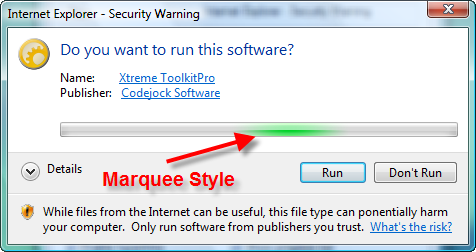
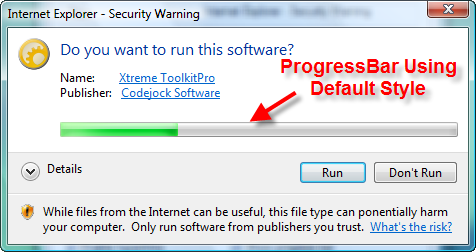
The illustrations below show a progress bar that is in the process of scrolling using both the marquee and standard styles:
See Also
- TaskDialog Control
- TaskDialogProgressBarStyle Enumeration
- SetProgressBarRange Method
- ProgressBarStyle Property
- ProgressBarPos Property
- EnableCallbackTimer Property
- Timer Event
Copyright (c) 1998-2024 Codejock Technologies. All rights reserved.