PaneContainer Collection
Description
Container object used in creating the structure/layout of docking panes.
For a list of all members defined in this module, see PaneContainer Members.
Object Model



Remarks
The PaneContainer class helps you understand the layout of the panes. Containers are used to create the structure/layout of panes. The main purpose of the PaneContainer class is to provide information about:
- How panes are grouped
- Where they are located
- If there are any floating panes
- How many floating panes exist
- How many auto-hidden panes exist
- Which side panes are auto-hidden
- Where panes are docked
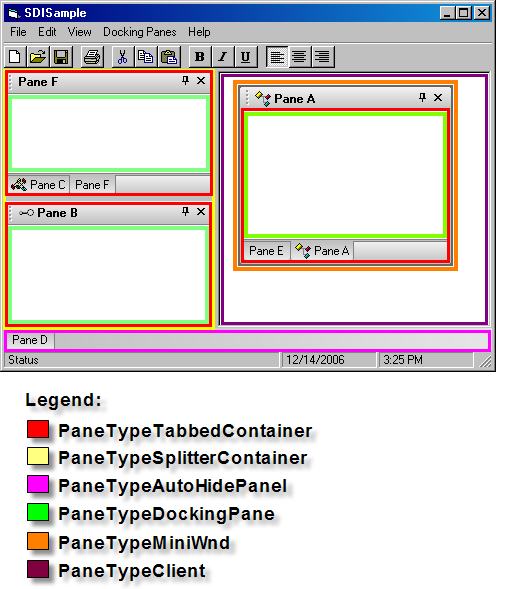
Both the PaneContainer.Type and Pane.Type properties use the flags from the DockingPaneType enumeration to specify which type of container they are.
In the picture, you can see 5 pane objects. Containers were used to create this layout. Panes B, D, and E are contained in a PaneTypeTabbedContainer. Pane C is contained in another PaneTypeTabbedContainer, and both splitter tabbed containers are contained in a PaneTypeSplitterContainer. The important thing to remember is that panes are always contained inside a PaneTypeTabbedContainer.
Using the PaneActionContainer class and the Action event, you can determine additional information such as where a pane will be docked and where it was actually docked.
See Also
- PaneContainer Members
- Action Event
- DockingPaneLayout Object
- ClientContainer Property
- DockingPaneLayout.Container Property
- TopContainer Property
- DockingPaneType Enumeration
- PaneActionContainer Object
- Direction Property
- PaneActionContainer.Container Property
Example
Copyright (c) 1998-2024 Codejock Technologies. All rights reserved.