DockingPaneType Enumeration
Description
Specifies the type of a docking pane container.
Members
| Member | Description |
|---|---|
| PaneTypeDockingPane | Object is a docking pane. This is the actual pane which contains user windows/controls. |
| PaneTypeTabbedContainer | Object is a tabbed container. This is a container that groups panes together and displays a tab strip to switch between panes. |
| PaneTypeSplitterContainer | Object is a splitter container. This is a container that groups other containers together using splitters to separate them. |
| PaneTypeMiniWnd | Object is a mini window container. This is a container that contains floating panes. Inside this container, there can be tabbed and splitter containers. |
| PaneTypeClient | Object is the client area container. This is a virtual container used for the client space. There will only be one client container. The client container can be hidden using the HideClient property. |
| PaneTypeAutoHidePanel | Object is an auto hide panel container. This is a container that contains the tab buttons of panes that have been un-pinned/auto-hidden. There can be an auto hide panel on the top, left, right, and bottom of an application. |
| PaneTypeSidePanel | Object is the side panel. SideDocking enables or disables "Visio" style client edge docking. Side docking can only occur to the inside edges of the client area. When SideDocking is enabled, any pane that is dragged to an inside edge of the client area will attempt to "snap" to that inside edge of the client. The pane will "snap" to the inside edge of the client and will leave a margin equal to that specified by SetSideDockingMargin. |
Remarks
Both the PaneContainer.Type and Pane.Type properties use the flags from the DockingPaneType enumeration to specify which type of container they are.
The PaneContainer class helps you understand the layout of the panes. The main purpose of the PaneContainer class is to provide information about how panes are grouped, where they are located, if there are any floating panes, how many floating panes, how many auto-hidden panes, which side panes are auto-hidden, where panes are docked, etc.
In the picture below, you can see 5 pane objects. Containers were used to create this layout. Panes B, D, and E are contained in a PaneTypeTabbedContainer. Pane C is contained in another PaneTypeTabbedContainer, and both splitter tabbed containers are contained in a PaneTypeSplitterContainer. The important thing to remember is that panes are always contained inside a PaneTypeTabbedContainer.
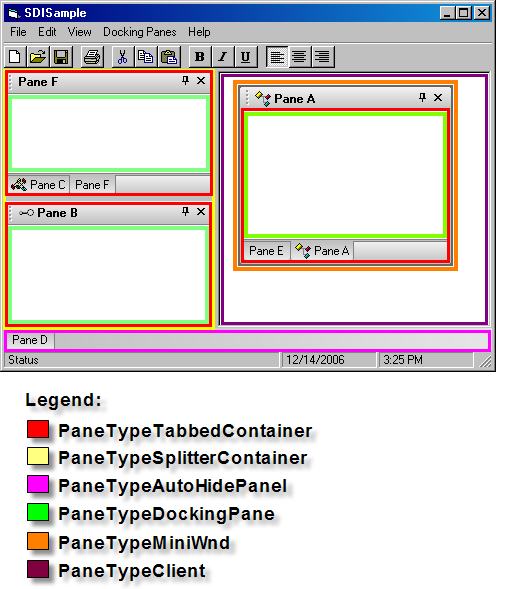
Using the PaneActionContainer class and the Action event, you can determine additional information such as where a pane will be docked and where it was actually docked.
Example
Pane Containers Sample (Visual Basic)
This sample illustrates how to use pane containers to restrict where panes can be docked in an application.
Private Sub DockingPaneManager_Action(ByVal Action As XtremeDockingPane.DockingPaneAction, ByVal Pane As XtremeDockingPane.IPane, ByVal Container As XtremeDockingPane.IPaneActionContainer, Cancel As Boolean)
    On Error Resume Next
    Dim Actions As Variant
    Actions = Array("PaneActionFloating", "PaneActionFloated", _
                    "PaneActionClosing", "PaneActionClosed", "PaneActionDocking", "PaneActionDocked", "PaneActionAttaching", "PaneActionAttached", "PaneActionPinning", "PaneActionPinned", _
                    "PaneActionCollapsing", "PaneActionCollapsed", "PaneActionExpanding", "PaneActionExpanded", "PaneActionActivated", _
                    "PaneActionDeactivated", "PaneActionDetaching", "PaneActionDragging", "PaneActionUnpinning", "PaneActionUnpinned")
    Debug.Print "Action = "; Actions(Action + LBound(Actions)); "; Title = "; Pane.Title
    '
    ' Container Parameter valid only for PaneActionDocking and PaneActionAttaching
    '
    ' Container.Direction = Where a pane would be docked if the user were to drop the pane
    ' for the PaneActionDocking action.
    '
    ' Container.Direction = Where a was actually docked for the PaneActionDocked action.
    '
    If (Action = PaneActionDocking) Then
        'Do not allow panes to be docked to the top or bottom of the application
        If (Container.Container.Type <> PaneTypeTabbedContainer) And _
           (Container.Direction = DockTopOf Or Container.Direction = DockBottomOf) Then
            Cancel = True
        End If
    End If
    If (Action = PaneActionAttaching) Then
        Debug.Print Container.Container.Count
    End If
End Sub
See Also
- HideClient Property
- PaneContainer Object
- PaneContainer.Type Property
- Pane.Type Property
- PaneActionContainer Object
- Action Event
Copyright (c) 1998-2024 Codejock Technologies. All rights reserved.