EnableCustomization Method
Description
Enables or disables status bar customization.
Syntax
Public Sub EnableCustomization( _
    ByVal Enable As Boolean _
)
Parameters
- Enable: True to enable customization, False to disable customization.
Remarks
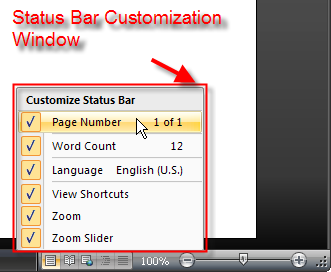
EnableCustomization will enable a status bar customization window to appear when the status bar is right-clicked. The customization window allows all the panes in the status bar to be hidden or displayed (if already hidden). All panes will be displayed in the window with the exception of the pane with Id equal to 0. The items displayed in the window are the Caption of the pane and the Value of the pane. Also indicated is the Visibility of the pane.
If using a StatusBarSliderPane or StatusBarSwitchPane, the SliderPaneClick and SwitchPaneClick events can be used to update the Caption and Value to show exactly what switch is selected in a switch pane or what percentage is selected in a slider. They can also be used to display any custom message in the customization window.
Note that the Text, which is what is visible on the status bar, is not displayed in the customization window. The Caption and Value of the pane can be set to any text that is desired in the customization window.
See Also
- StatusBar Collection
- Caption Property
- Value Property
- Visible Property
- Text Property
- SliderPaneClick Event
- SwitchPaneClick Event
- StatusBarSliderPane Object
- StatusBarSwitchPane Object
Copyright (c) 1998-2024 Codejock Technologies. All rights reserved.