SwitchPaneClick Event
Description
Occurs when a switch in the Switch Pane has been clicked.
Syntax
Public Event SwitchPaneClick( _
    ByVal Pane As StatusBarSwitchPane, _
    ByVal Switch As Long _
)
Parameters
- Pane: Reference to the switch pane that was clicked.
- Switch: Id of the Switch that was clicked.
Remarks
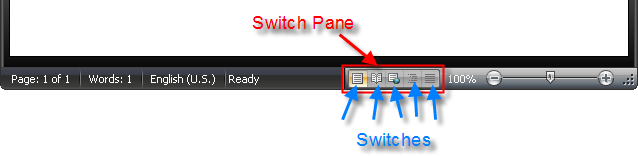
The SwitchPaneClick event can be used to select/check a switch when it is clicked as well as perform some other action when the appropriate switch has been clicked.
Notes
- AddSwitchPane is used to add a Switch Pane to the status bar.
- AddSwitch will add a new switch to the Switch Pane.
- RemoveSwitch removes a switch by passing in the Id of the switch to remove.
- The Checked property holds the Id of the currently selected switch.
Example
' Code to load images for switches, add a switch pane, and switches

CommandBars.Icons.LoadBitmap App.Path & "\res\StatusBarViewSwitches.png", _
    Array(ID_SWITCH_PRINTLAYOUT, ID_SWITCH_FULLSCREENREADING, ID_SWITCH_WEBLAYOUT, ID_SWITCH_OUTLINE, ID_SWITCH_DRAFT), xtpImageNormal

Dim SwitchPane As StatusBarSwitchPane
Set SwitchPane = StatusBar.AddSwitchPane(ID_INDICATOR_VIEWSHORTCUTS)

SwitchPane.AddSwitch ID_SWITCH_PRINTLAYOUT, "Print Layout"
SwitchPane.AddSwitch ID_SWITCH_FULLSCREENREADING, "Full Screen Reading"
SwitchPane.AddSwitch ID_SWITCH_WEBLAYOUT, "Web Layout"
SwitchPane.AddSwitch ID_SWITCH_OUTLINE, "Outline"
SwitchPane.AddSwitch ID_SWITCH_DRAFT, "Draft"
SwitchPane.Checked = ID_SWITCH_PRINTLAYOUT
SwitchPane.Caption = "&View Shortcuts"

Private Sub StatusBar_SwitchPaneClick(ByVal Pane As XtremeCommandBars.StatusBarSwitchPane, ByVal Id As Long)
    Pane.Checked = Id

    Select Case Id
        Case ID_SWITCH_PRINTLAYOUT:
            MsgBox "Print Layout Switch Clicked"
        Case ID_SWITCH_FULLSCREENREADING:
            MsgBox "Full Screen Reading Switch Clicked"
        Case ID_SWITCH_WEBLAYOUT:
            MsgBox "Web Layout Switch Clicked"
        Case ID_SWITCH_OUTLINE:
            MsgBox "Outline Switch Clicked"
        Case ID_SWITCH_DRAFT:
            MsgBox "Draft Switch Clicked"
    End Select
End Sub
See Also
- StatusBar Collection
- AddSwitchPane Method
- AddSwitch Method
- RemoveSwitch Method
- Checked Property
- Id Property
Copyright (c) 1998-2024 Codejock Technologies. All rights reserved.