EnableFrameTheme Method
Description
Enables or disables the Ribbon Office 2007 style themed window frame.
Syntax
Public Sub EnableFrameTheme()
Remarks
By default, the themed window frame is disabled until EnableFrameTheme is called to enable the theme. It is recommended that you call EnableFrameTheme when using the Ribbon. You have the option to keep the window frame un-themed, but you must use the ShowQuickAccessBelowRibbon property to move the Quick Access bar to the bottom of the Ribbon, and you cannot use the AddSystemButton Method.
The picture below illustrates how the Ribbon looks using a themed window frame compared to using the system default window frame.
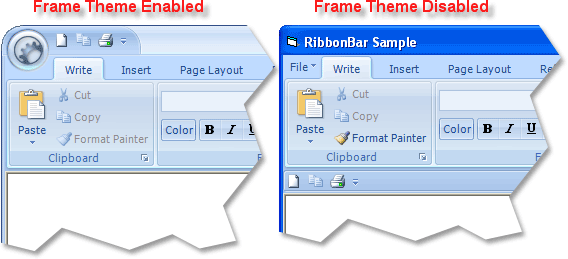
Note: In the picture above, an alternative way to display the system menu is used; it simply adds an xtpControlPopup button to the ActiveMenuBar.
Example
EnableFrameTheme Sample (Visual Basic). This sample illustrates how to enable the Ribbon Office 2007 style themed window frame in your application.
RibbonBar.EnableFrameTheme
See Also
Copyright (c) 1998-2024 Codejock Technologies. All rights reserved.